Preserve the collaboration history that must survive the migration
Move users and active work to the new platform while keeping legally significant messages, files, and journal data governed and accessible outside production. The new environment receives what ongoing operations require, not the entire historical population.
The work moves. The history still needs a destination.
Tenant consolidations after an acquisition, platform separations after a divestiture, and legacy messaging retirements begin with the same immediate objective: move users and active work.
Move the active work
The migration plan covers the immediate business need: move users, transfer active workspaces, cut over, and retire the old system.
Resolve the history
Years of channels, conversations, shared files, and journal data remain in the source. That population needs a destination before the environment can be retired.
Different information, different futures
Some history belongs in production. Some is subject to legal holds or retention requirements. Some may be eligible for disposition.
Decide before the plan is fixed
If the historical population is addressed only after the target environment and budget are set, it becomes an exception to a plan already in motion.
Decide what the new platform inherits
The simplest plan is to move all of it, and that plan is usually wrong.
Moving everything carries the old problems forward
Historical content carried into the target platform brings the governance problems of the old environment into the new one, where retention rules designed for current work then apply to content that needs different treatment entirely.
STORAGEPaid for indefinitely
SEARCHYears of conversations exposed
ACCESSOpen to every user with search
02
Migrated history ends up ungoverned
In practice, migrated history often lands in a folder named after the migration, or for journal populations, a set of search folders with no owner. Nothing governs it from there.
RETENTIONNo schedule reaches it
DISPOSITIONNever runs against it
LOCATIONStays in production indefinitely
03
Ungoverned history stays a liability
The data remains in the organization's possession, custody, and control, so every obligation and risk that applies to the production platform applies to the history it holds.
LITIGATIONDiscoverable
PRIVACYSearchable for DSARs
SECURITYPart of the attack surface
From journal reports buried in Microsoft 365
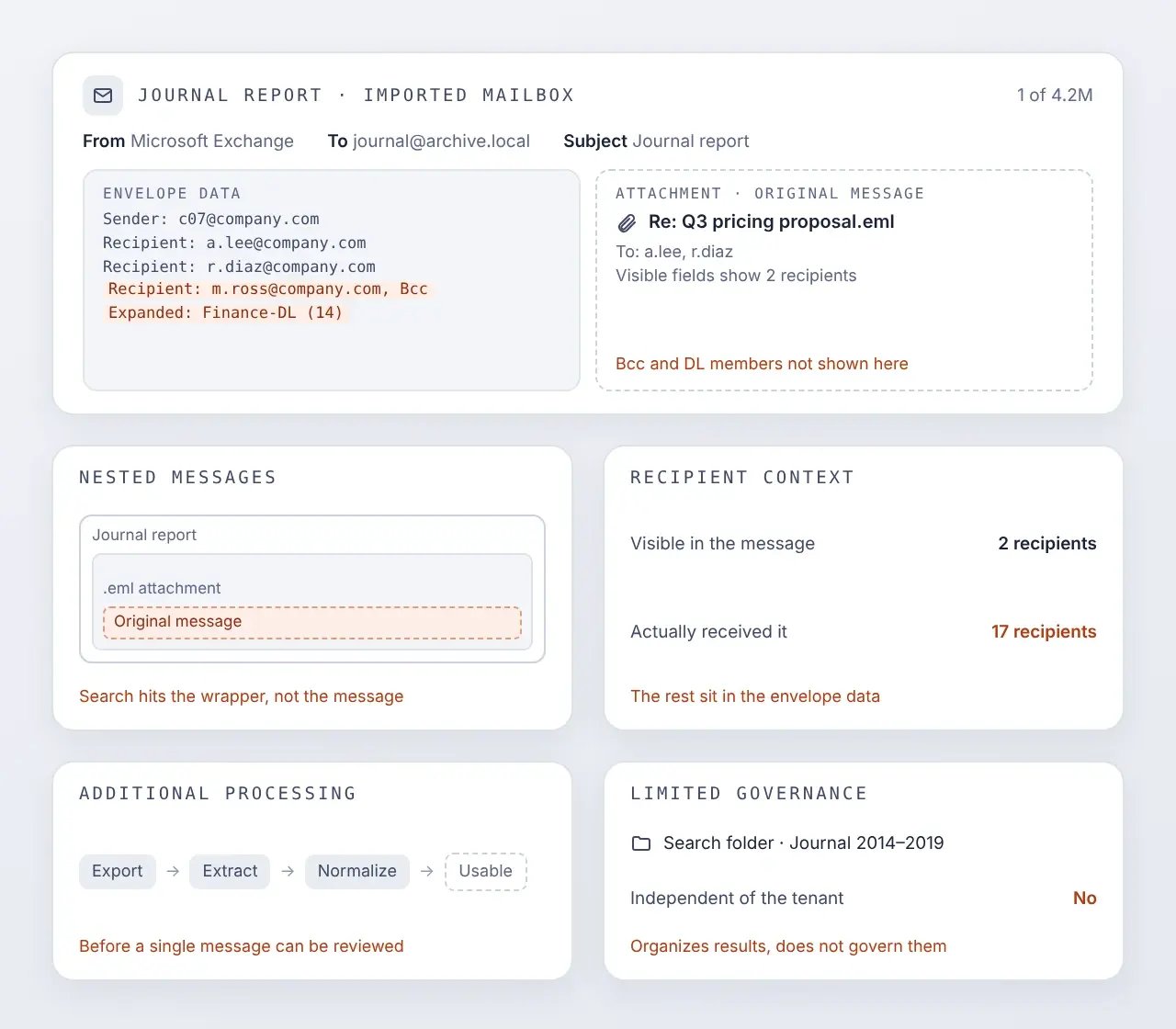
When historical journal data is imported into Microsoft 365, it may remain structured as journal reports and organized through search folders. The data is present, but it can be difficult to search, govern, and use.
Nested messages | Each journal report contains the original message as an attachment, complicating search and review.
Recipient context | Bcc and expanded distribution-list recipients are recorded in the envelope data rather than the attached message’s visible fields.
Additional processing | Journal reports may require extraction and normalization before the underlying messages can be used.
Limited governance | Search folders organize results, but they do not create an independent preservation and governance environment.
to journal data preserved outside production
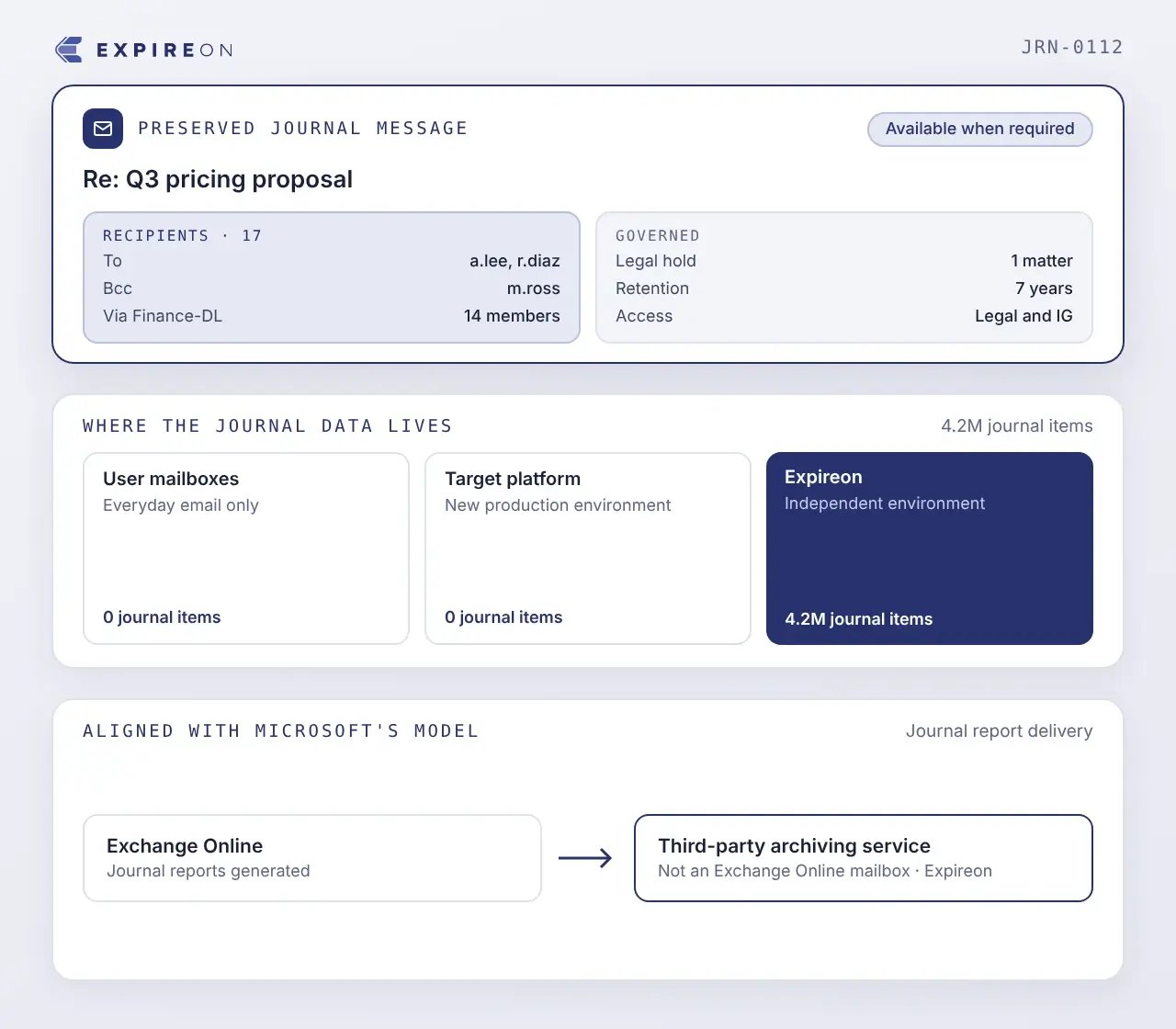
Expireon™ provides an independent environment for preserving and governing journal data, separate from user mailboxes and the target collaboration platform.
Available when required | Journal populations remain preserved, governed, and accessible for legal and governance use.
Separate from user mailboxes | Journal reports do not sit alongside everyday email.
Out of the target platform | Preservation-only data does not add to the new production environment.
Aligned with Microsoft’s model | Exchange Online journal reports are delivered to an on-premises archiving system or a third-party archiving service, not an Exchange Online mailbox.
Give each population the right destination
The source environment contains information with three different futures. Resolving all three makes decommissioning possible.
MigrateMove active work into production
Move users, active workspaces, and current information into the new production environment. Onboarding 365 Complete supports large-scale Microsoft 365 onboarding.
PreserveKeep required history outside production
Preserve legally significant historical messages, files, and journal data in Expireon™, where they remain governed and accessible outside both the source and target platforms.
DisposeRetire what no longer has a purpose
Allow information with no continuing business, legal, regulatory, client, or governance requirement to proceed to disposition through the organization’s approved process.
DecommissionRetire the source platform
Once every population has a governed destination, the source platform can be decommissioned. The migration is complete when the organization no longer depends on the environment it intended to leave.
Preserve the conversation around every message
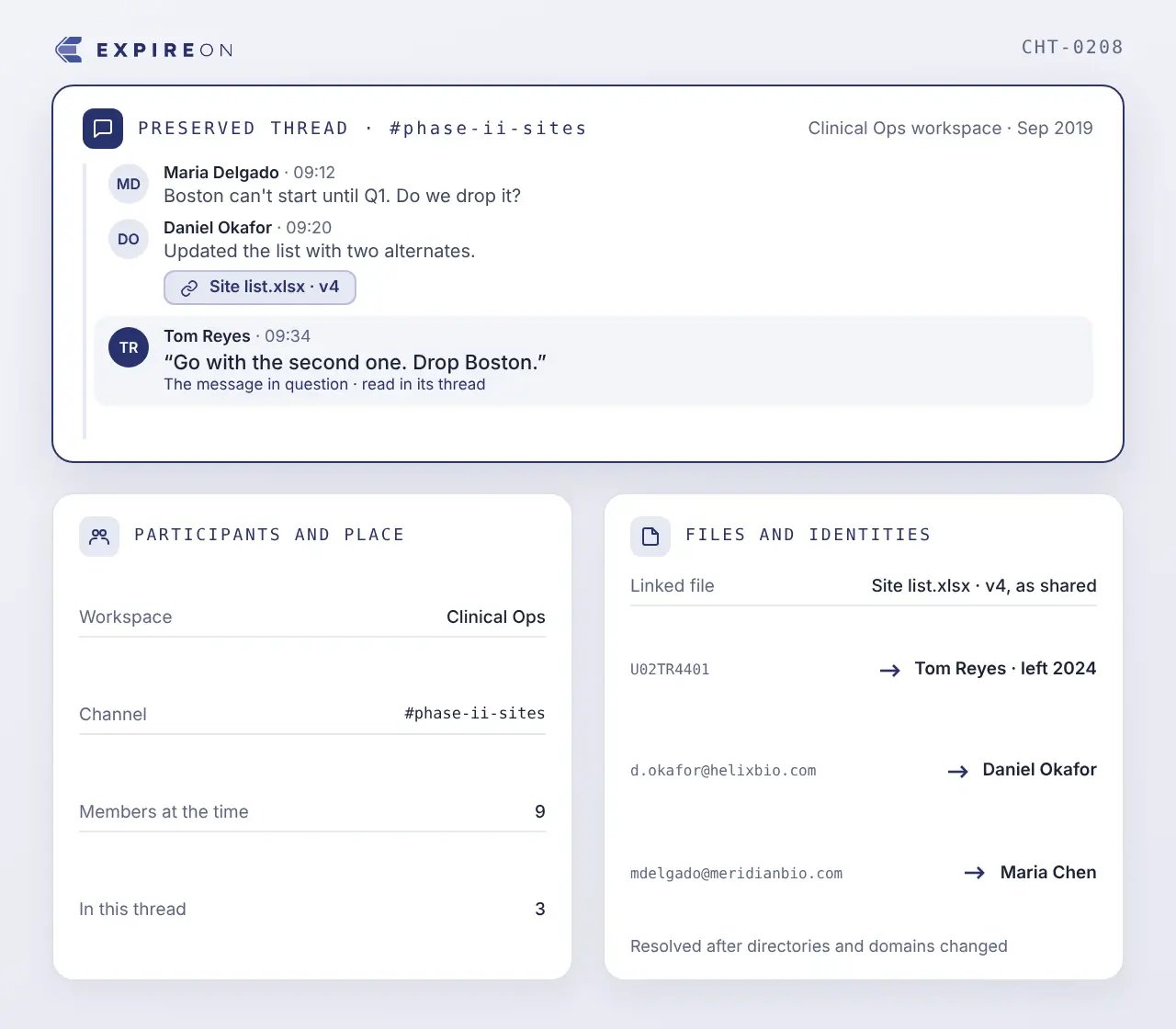
A message pulled out of its thread, separated from the participants who were in the channel, and detached from the file it referred to can be read to mean something other than what it meant at the time.
Participants and place | Who was in the conversation, and which workspace or channel the exchange belonged to.
Files and identities | What was attached or linked, and how the historical account maps to the person behind it after directories and domains change.
Collaboration platform migration FAQs
What is collaboration platform migration with Legal Data Continuity?
It keeps legally significant historical messages, files, and journal data governed and accessible while users and active business content move to a new collaboration environment, so preservation-only content does not become production data in the new platform.
Can journal data be migrated into Microsoft 365?
Microsoft 365 is not designed to serve as a journaling destination. Exchange Online journaling requires journal reports to be delivered to an on-premises archiving system or a third-party archiving service, so historical journal populations need an independent preservation environment.
If journal data is moved into Microsoft 365, can it be searched for eDiscovery?
Not usefully. A journal report is an envelope message with the original attached, and the envelope carries the true recipient information, including blind copies and expanded distribution list members. Searches return envelopes rather than messages, recipient searches may miss expected results, and everything has to be extracted before review.
Do search folders govern migrated journal data?
No. A search folder is a saved view, not a retention or governance construct. Journal data placed in one remains ungoverned while staying in the organization's possession, custody, and control.
Should all historical collaboration content move to the new platform?
Usually not. Content that no longer supports current work adds storage cost, broadens user access to old conversations, and applies production retention rules to information that needs different treatment. It also tends to become ungoverned: migrated history often sits in a folder no retention schedule reaches, while remaining discoverable and subject to privacy requests.
What happens to legal holds during a collaboration platform migration?
Holds continue through the migration. Preserving the affected content independently before cutover keeps the obligation intact and allows the source platform to be decommissioned.
Why can't we decommission the old collaboration platform after migrating?
Usually because a subset of historical content still has to remain reachable. Preserving that subset independently removes the dependency and allows the system to be retired.
Move the work. Preserve the history.
See how Cloudficient can keep legally significant collaboration history governed and accessible while your users and active content move to the new platform, and how journal populations can be preserved without entering production.