Use available activity to focus the interview, compare responses with the record, and investigate gaps.

Preserve Microsoft 365 activity before it expires
Microsoft 365 records how people interacted with files, repositories, and collaboration platforms. Standard audit records are generally retained for 180 days, and matters routinely concern conduct from well before that window.
Audit activity expires before most matters arise
Identification begins with what the legal team already knows. Available Microsoft 365 audit activity can show which repositories people used, accessed, or shared from, but that context is often disconnected from the identification process.
A custodian cannot recall every SharePoint site used several years earlier.
A static data map identifies who owns a repository without showing who worked in it.
Permissions establish that hundreds of employees could reach a site without distinguishing the handful who did.
A current org chart does not reflect the team structure in place during the relevant period.
Retain the history, index what informs decisions
Preservation is time-sensitive in a way later stages are not. Analysis and review can wait, but information that expires before a complaint arrives may be unavailable when the matter begins.
CaseFusion retrieves available Microsoft 365 audit records on an ongoing basis and retains them for the period the organization sets. Because those records are available only for a limited time, preservation cannot wait.
Not every audit record helps a legal team scope a matter. CaseFusion indexes the event types that inform discovery decisions and leaves aside duplicative records, indistinct interactions, and unattributable events.
Identification runs on attribution: which person interacted with which repository, during which period, holding which role. What remains is searchable under live matter pressure and joined to the rest of the matter.
From enterprise data maps…
Enterprise data maps are usually built for governance, identifying applications, owners, data types, retention policies, locations, and platforms. That is useful information, and it answers almost none of the questions a specific matter raises.
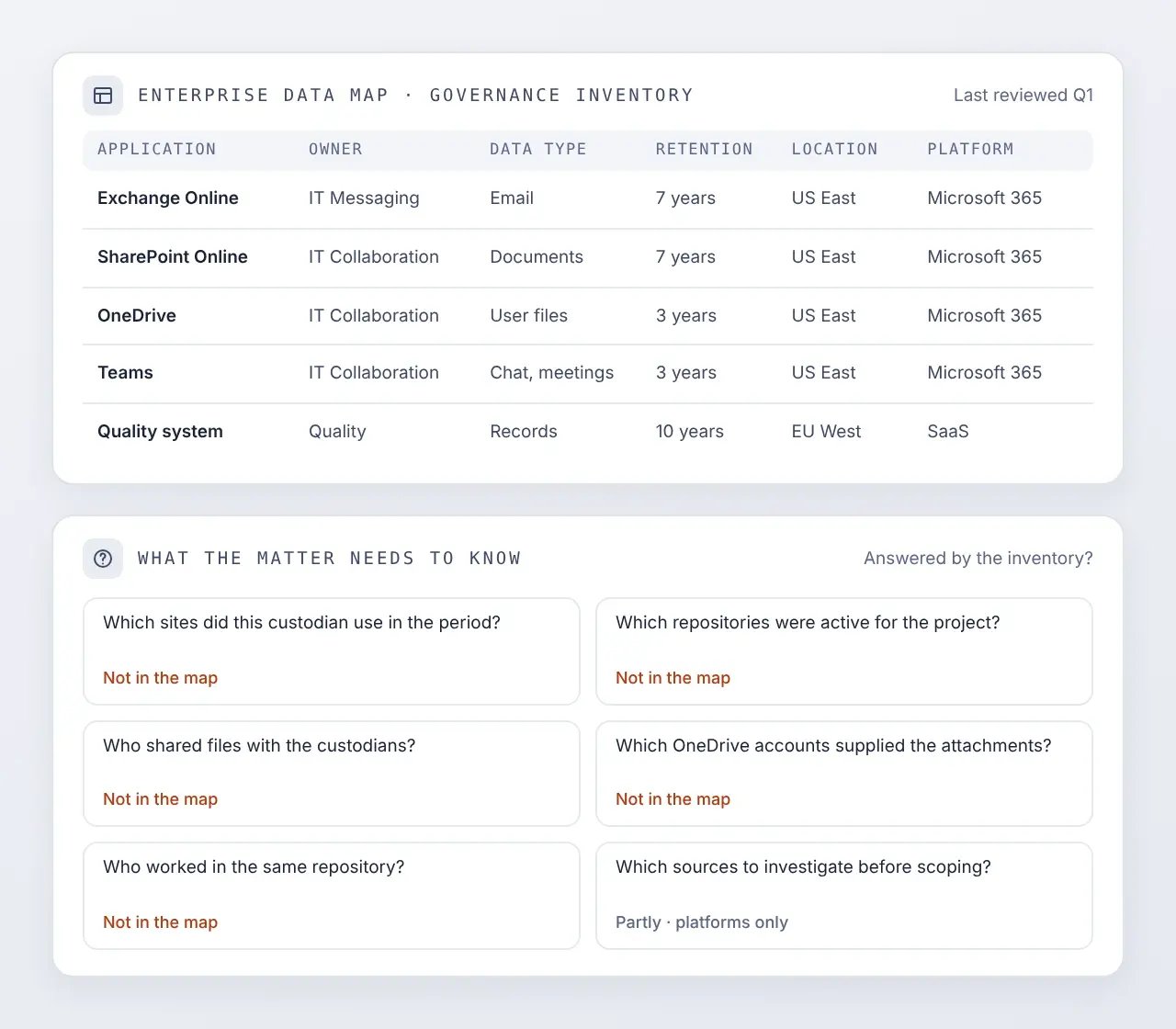
- Sites | Which SharePoint sites did this custodian use during the relevant period?
- Repositories | Which repositories were active for the project at issue?
- Sharing | Who shared files with the custodian population?
- Attachments | Which OneDrive accounts supplied the cloud attachments?
- Collaborators | Which people worked in the same repository?
- Investigation | Which sources should be investigated before preservation scope is finalized?
…to a matter data map
CaseFusion combines indexed Microsoft 365 activity with other available information to build a dynamic data map for the matter. It shows the people, repositories, relationships, data sources, and activity that may be relevant.
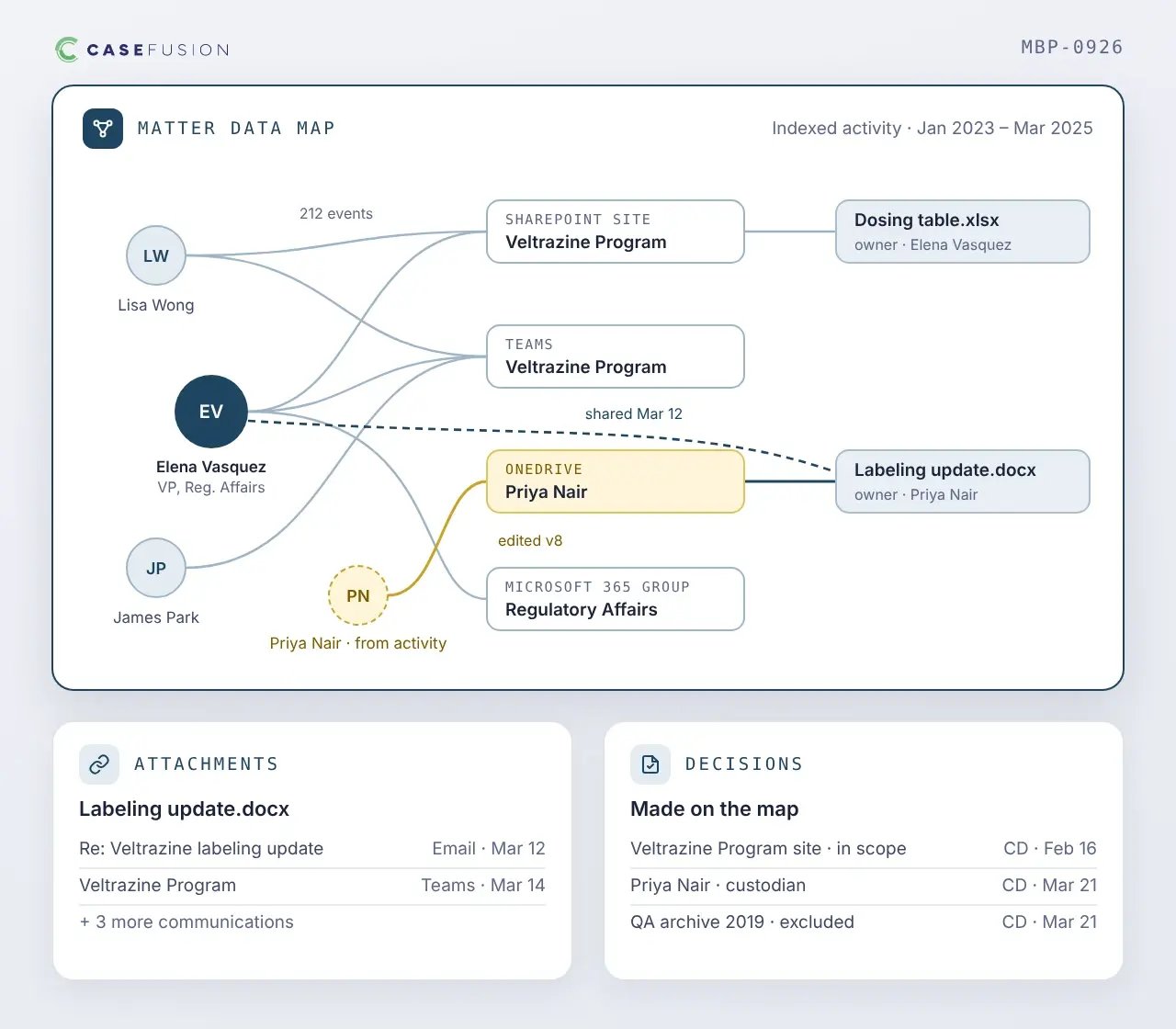
- People | Custodians and potential custodians, with the roles and relationships they held at the time
- Locations | OneDrive accounts, SharePoint sites, Teams locations, and Microsoft 365 groups
- Files | Files and file owners
- Activity | Sharing and access activity across relevant periods
- Attachments | Cloud attachments and the communications that referenced them
- Decisions | The decisions the legal team made along the way
What activity can and cannot establish
Audit activity can provide valuable evidence to inform discovery scope, but it must be interpreted within its limitations. Understanding what the records capture, what they may omit, and how long they remain available helps support informed scoping decisions and creates a clearer basis for explaining those decisions later.
Activity can establish that a recorded interaction with a file or repository occurred, and when.
It cannot establish that the interaction has anything to do with the matter, because relevance is a legal judgment.
Activity can establish that a person shared content and who received access.
It cannot establish what a person read, how much of it, how long they spent, what they understood, or whether they relied on it.
Activity can show that others used the same files or repositories, or that a source sits outside the initial scope.
It cannot establish that they belong in the matter, or that no recorded activity means nothing happened.
Investigate scope, don't expand it
Activity-driven identification should inform scope, not expand it automatically. Treating every recorded event as a reason to add a person or source simply replaces one form of over-collection with another.
Surface people who interacted with the same repositories or files as those already in scope, then validate whether they should be added.
assess
Apply in-place preservation when a surfaced source must be protected while the legal team determines whether it belongs in scope.
Resolve links in messages and preserve the available file versions associated with recorded sharing or recipient-access events.
collection
Use activity from the relevant period to determine whether a source should be added to collection scope.
Leave a preserved source out of collection when the available information supports that decision, and record the rationale in the matter.
Maintain the information supporting the decision
An activity-informed scope decision is only as explainable as the record behind it. A decision recorded at the time, with the activity that informed it, is a position the legal team can explain.
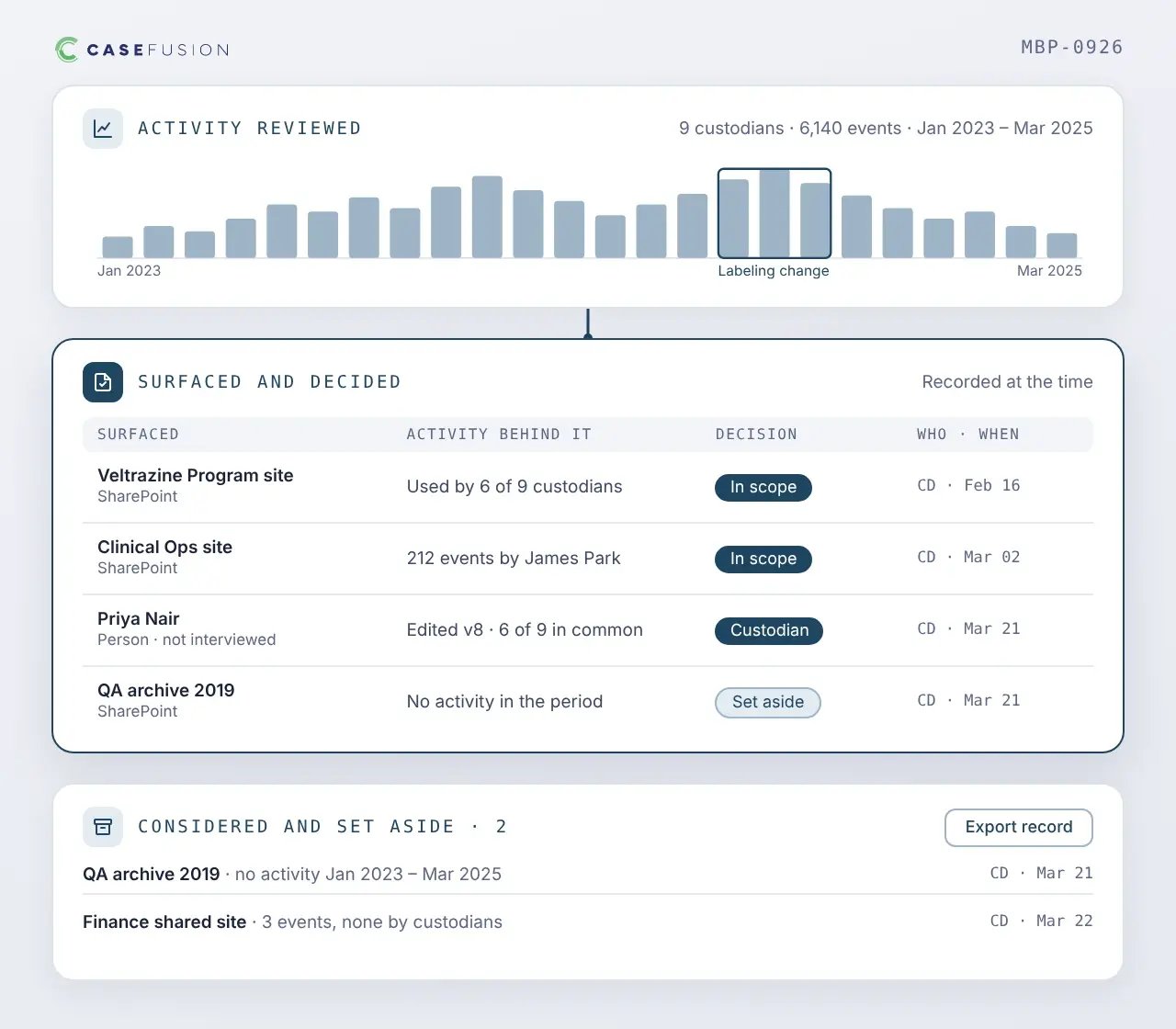
- Activity | The activity that was reviewed
- Surfaced | The sources and people it surfaced
- Decisions | What the legal team decided about each, when, and on what basis
- Set aside | The sources considered and set aside, which a requesting party is most likely to ask about
Works alongside Microsoft Purview Audit
Microsoft 365 generates the underlying activity record, while Microsoft Purview Audit and Microsoft Purview eDiscovery provide native audit and discovery capabilities. CaseFusion builds on that foundation, connecting identity, activity, repositories, content, and matter decisions across the workflow.
- Captures user and administrative activity across Microsoft 365
- Supports searching and exporting recorded activity
- Manages case sources around users, groups, mailboxes, OneDrive, and SharePoint
- Explores relationships across managers, direct reports, collaborators, and groups
- Retains activity past standard audit retention
- Indexes and normalizes records for use under live matter pressure
- Joins activity to the roles people held when events occurred
- Connects activity to repositories, documents, and recorded decisions
Audit log preservation & data mapping FAQs
How long does Microsoft retain Microsoft 365 audit logs?
Why preserve audit logs if Microsoft already provides Purview Audit?
Why are audit logs useful for eDiscovery identification?
Does activity establish that a source is relevant?
Does a file-access event establish that a user read the file?
Is the CaseFusion data map a complete map of the enterprise?
Does an absence of recorded activity mean nothing happened?
Does CaseFusion replace Microsoft Purview Audit?
Give every matter a better starting point
See how CaseFusion preserves, indexes, and connects that history so legal teams can scope matters with better information rather than more data.