Centralized migration control
Manage discovered files, ownership decisions, destinations, migration status, and exceptions, from one console.




Discover, validate, and migrate PST files from endpoints, network shares, and home drives into Microsoft 365/Exchange Online or Expireon. Gain a complete view of your PST files, apply the right treatment to their contents, and reach a verified outcome.
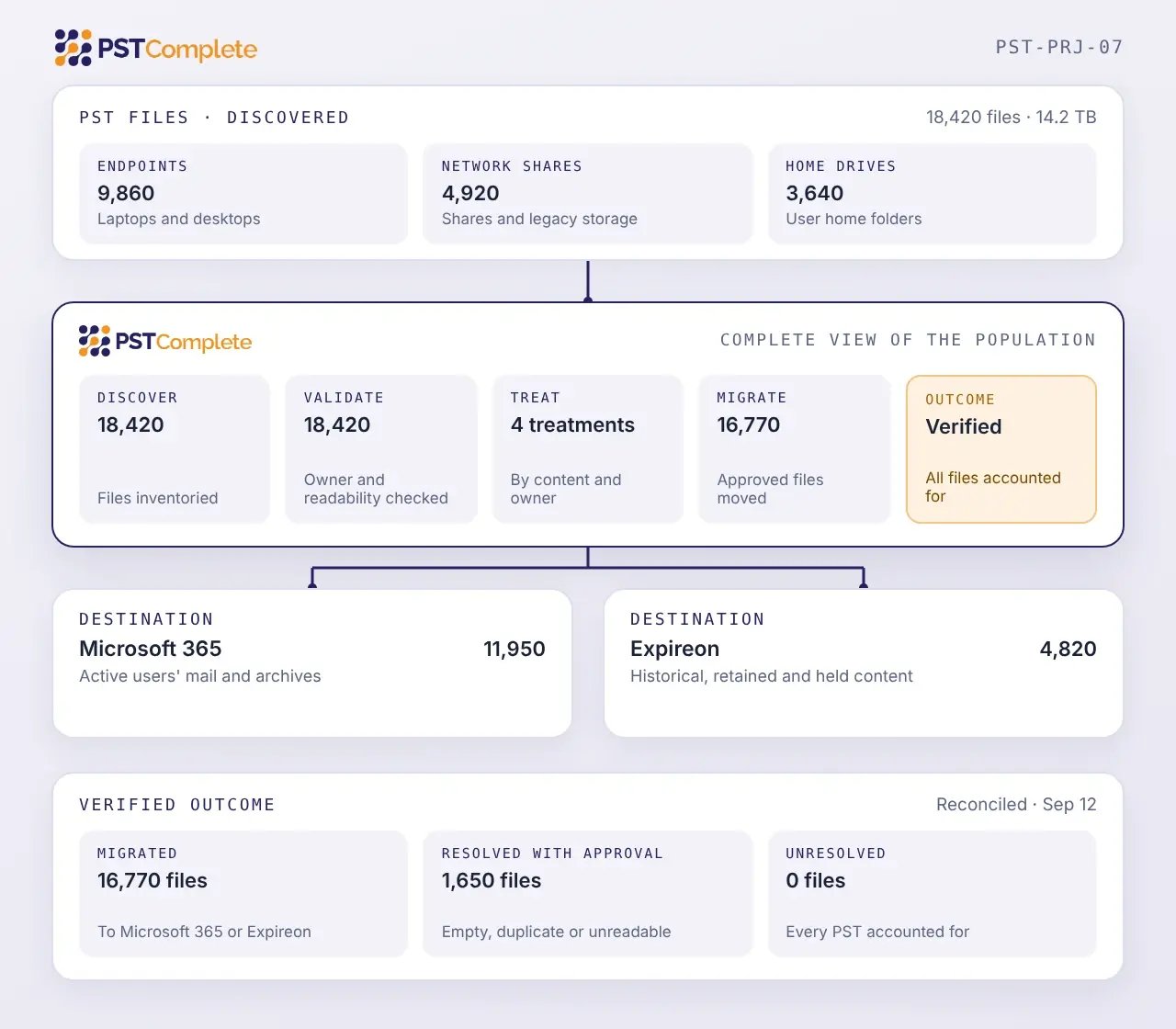
PST files can be distributed across devices, shared drives, home directories, archives, and other storage. A complete migration must identify the population, resolve historical identities, assign each file a destination, and account for every outcome.
File inventories and user reports may not reveal every PST. Discovery must account for duplicates, renamed copies, and files outside expected locations.
PSTs may have been copied, renamed, or left behind by former employees. Map each file to the appropriate active user, former employee, shared function, or approved destination.
PSTs may contain years of messages, attachments, calendar entries, and contacts. The right destination depends on how that information must be used after the migration.
PST content may remain subject to legal holds, regulatory or client requirements, and records schedules. Those requirements must remain in force throughout the transition.
User communication, destination preparation, scheduling, exception handling, validation, and final cleanup must be coordinated as part of the migration.
Damaged, incomplete, inaccessible, or unsupported PSTs can interrupt processing. Keep every exception visible until it is resolved or approved.
After users move to Microsoft 365, PST files may remain across laptops, network shares, home drives, and legacy storage. Until they are resolved, their contents can be difficult to inventory, search, and govern consistently.
What PSTComplete helps you do
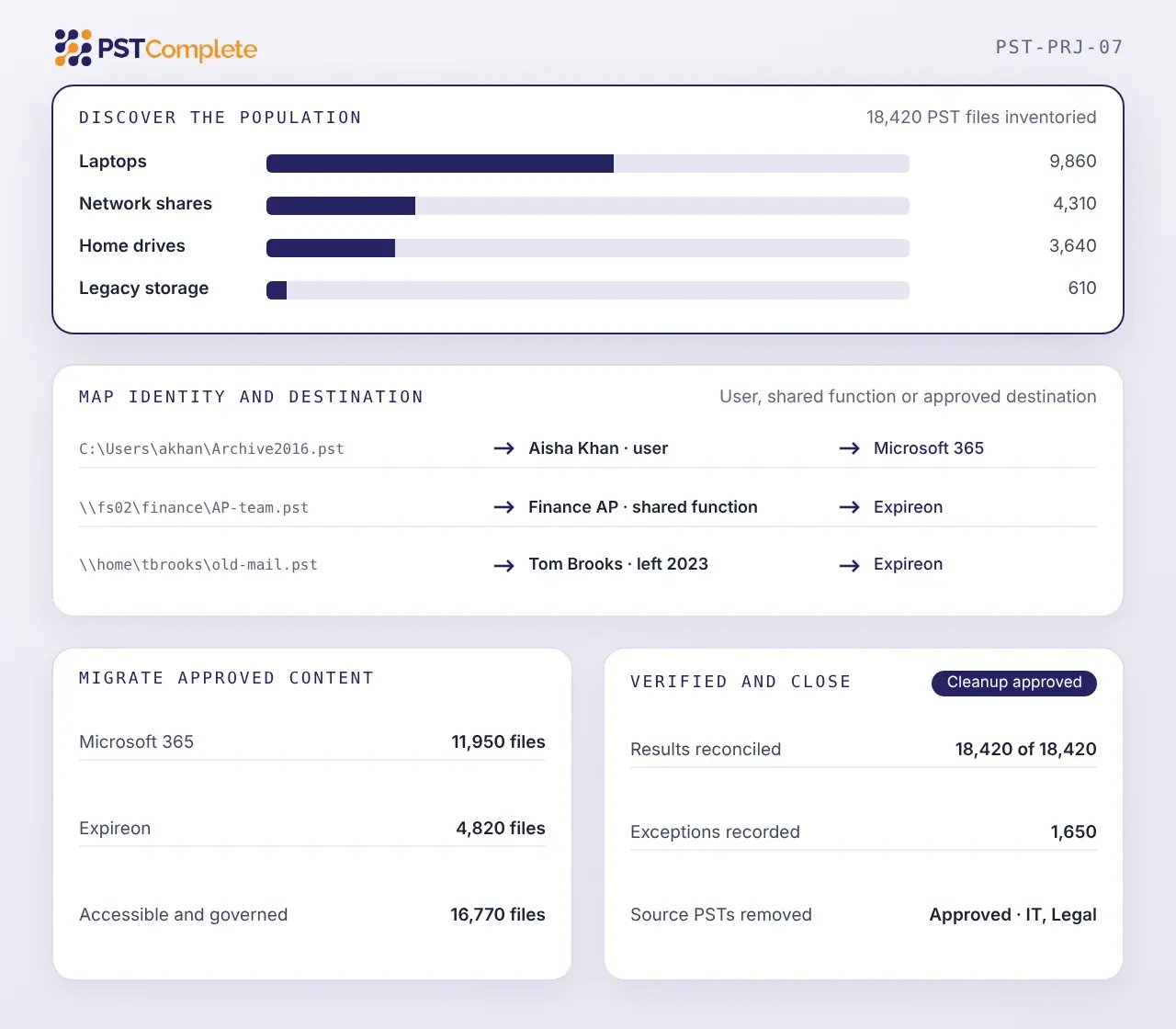
PSTComplete combines purpose-built PST migration technology with specialist managed delivery.
Scan approved locations to locate PST files across the organization.
Create a centralized view of discovered files, including their location, available ownership information, size, and migration status. Associate each PST with an approved ownership category. Automated ownership matching algorithms assist with this process
Assess file integrity and identify PSTs that require repair, investigation, or exception handling before migration. Approved PST content then moves according to the defined migration policy
Confirm that approved content has reached its intended destination before original PST files enter the final cleanup process.
Manage discovered files, ownership decisions, destinations, migration status, and exceptions, from one console.
Organize migration into manageable groups based on location, user population, destination, priority, or other project requirements – applying consistent policies across workflows
Maintain visibility into completed work, active migrations, retries, unresolved exceptions, and remaining scope.
An agent deployed on end-user devices moves PST content directly to Exchange Online, without first collecting files to a central location. This allows large user populations to be migrated in parallel.
PSTComplete brings PST remediation into one centrally managed workflow, migrating content directly from end-user devices to Exchange Online to help reduce project timelines and corporate bandwidth demands while supporting enterprise scale.
Manage discovered files, ownership decisions, destinations, migration status, and exceptions from one console.
Organize migration into manageable groups based on location, user population, destination, priority, or other project requirements, applying consistent policies across workflows.
Maintain visibility into completed work, active migrations, retries, unresolved exceptions, and remaining scope.
An agent deployed on end-user devices moves PST content directly to Exchange Online without first collecting files in a central location. This allows large user populations to be migrated in parallel.
 01
02
03
Confirm that approved content has reached its intended destination before original PST files enter the final cleanup process.
04
Support the controlled removal of remediated PST files from their original locations.
PSTComplete provides the visibility needed to compare the discovered PST population with the resulting migration outcome.
Identify files and items that could not be processed as expected, including the reason and current resolution status.
Maintain a centralized record of discovery, ownership, treatment, migration, exception, validation, and completion activity.
Confirm that approved content has reached its intended destination before original PST files enter the final cleanup process.
Support the controlled removal of remediated PST files from their original locations.
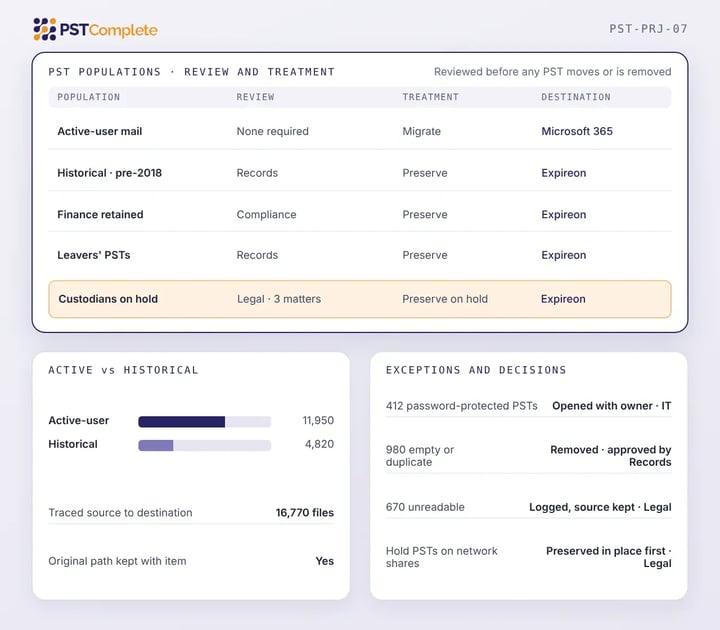
PST files may contain information subject to legal hold, regulatory retention, records policies, investigations, or other continuing obligations. Those requirements should be understood before a PST is migrated or removed.
PSTComplete supports a controlled treatment process that allows the organization to:
Identify PST populations requiring legal, compliance, or records review.
Move content associated with active users into Microsoft 365 when continued access is required. Before migration, confirm the target account, ownership mapping, available capacity, and approved migration population.
Direct historical, compliance, leaver, or legally significant PST data to Expireon when it must remain governed and accessible for compliance and eDiscovery purposes outside an active user mailbox.
Use Microsoft 365 and Expireon together when PST files contain a mixture of active-user content and information with different legal, retention, or operational requirements. PSTComplete applies the approved treatment instead of forcing every PST into the same destination.
Know what PST files exist, where they are located, who they belong to, and what condition they are in before migration decisions are finalized.
Direct content according to ownership, business use, accessibility, retention, and legal requirements.
Use automated workflows and specialist delivery to reduce the operational load placed on internal IT.
Move historical mailbox information out of fragile, distributed PST files and into managed systems where retention, preservation, search, access, and disposition can be managed more consistently.

Establish the full scope, apply the right destination strategy, and complete PST remediation through one managed migration project.