Skip to content
Contact Us
Background image

Gain control over cloud attachments

A preserved email says see the attached forecast. The link still resolves, but it opens a file that was rewritten six months after the message was sent. Cloud collaboration separated communications from the files they reference.

A cloud attachment is a relationship, not a file

A traditional email attachment is static. A cloud attachment is a link to a file held in OneDrive, SharePoint, or another repository, and from that moment the communication and the file exist separately.

The parent communication

The message records the link, sender, recipients, and time, but not the linked file.

The linked file

The file remains in its repository and may change after the message is sent.

The repository and its owner

The repository identifies where the file is stored and who owns the location.

The versions that matter

The relevant version may be associated with sharing, recorded access, or another event, not simply the current file.

Preserving the message may not preserve the file

A communication that says see the attached forecast is close to meaningless without the forecast, and the connection between the two is the part that disappears first.

The message is held, the file is not

An employee receives an email linking to a file in a colleague's OneDrive and is then placed on legal hold. The email is preserved in their mailbox. The file is not, because it lives somewhere the hold does not reach.

CUSTODIAN Placed on legal hold
EMAIL Preserved in the custodian's mailbox
LINKED FILE In a colleague's OneDrive, outside the hold
The file keeps changing

If the colleague and the repository fall outside preservation scope, the file can change, moved, replaced, or deleted. The message survives with a link that no longer resolves to what it did when it was sent.

CHANGED Edited after the message was sent
MOVED OR REPLACED No longer where the link pointed
DELETED Gone entirely
Collect to preserve

CaseFusion closes the gap through a collect-to-preserve workflow: identify the communication, detect the cloud attachment, resolve the file and its repository, retrieve the selected versions, and preserve it all together.

DETECT The cloud attachment in the communication
RESOLVE The underlying file and its repository
PRESERVE Selected versions as connected matter ESI

Collect the current version only

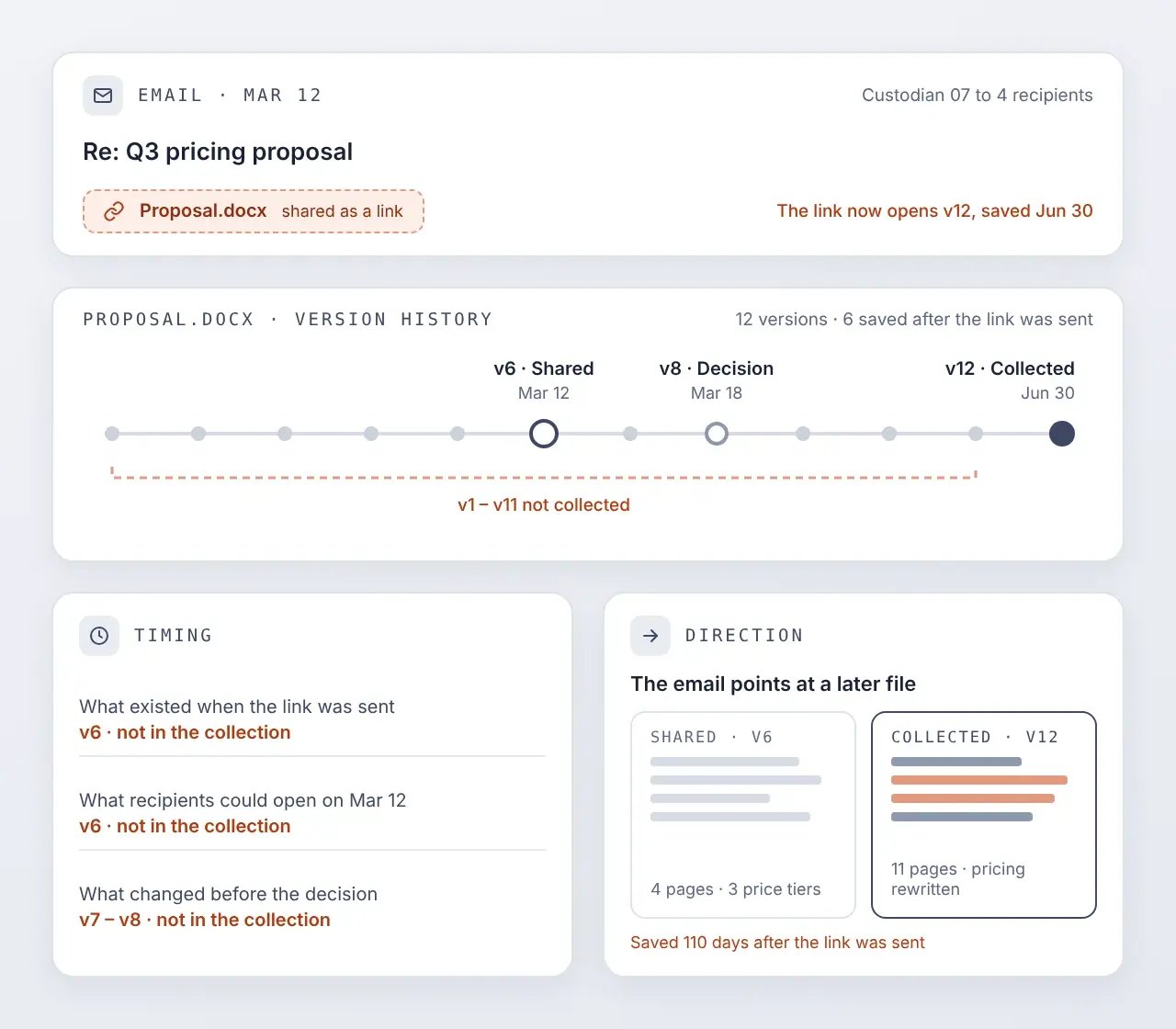
A cloud-hosted file can change many times between the day it is shared and the day it is collected. Collecting the current version only reduces volume, and produces a file that may bear little resemblance to what was shared.

  • Timing | May not reflect what existed when the link was sent, what a recipient could open at the time, or what changed before a decision was made
  • Direction | Leaves the communication pointing at something that came later
collect-the-current-version-only

or every available version

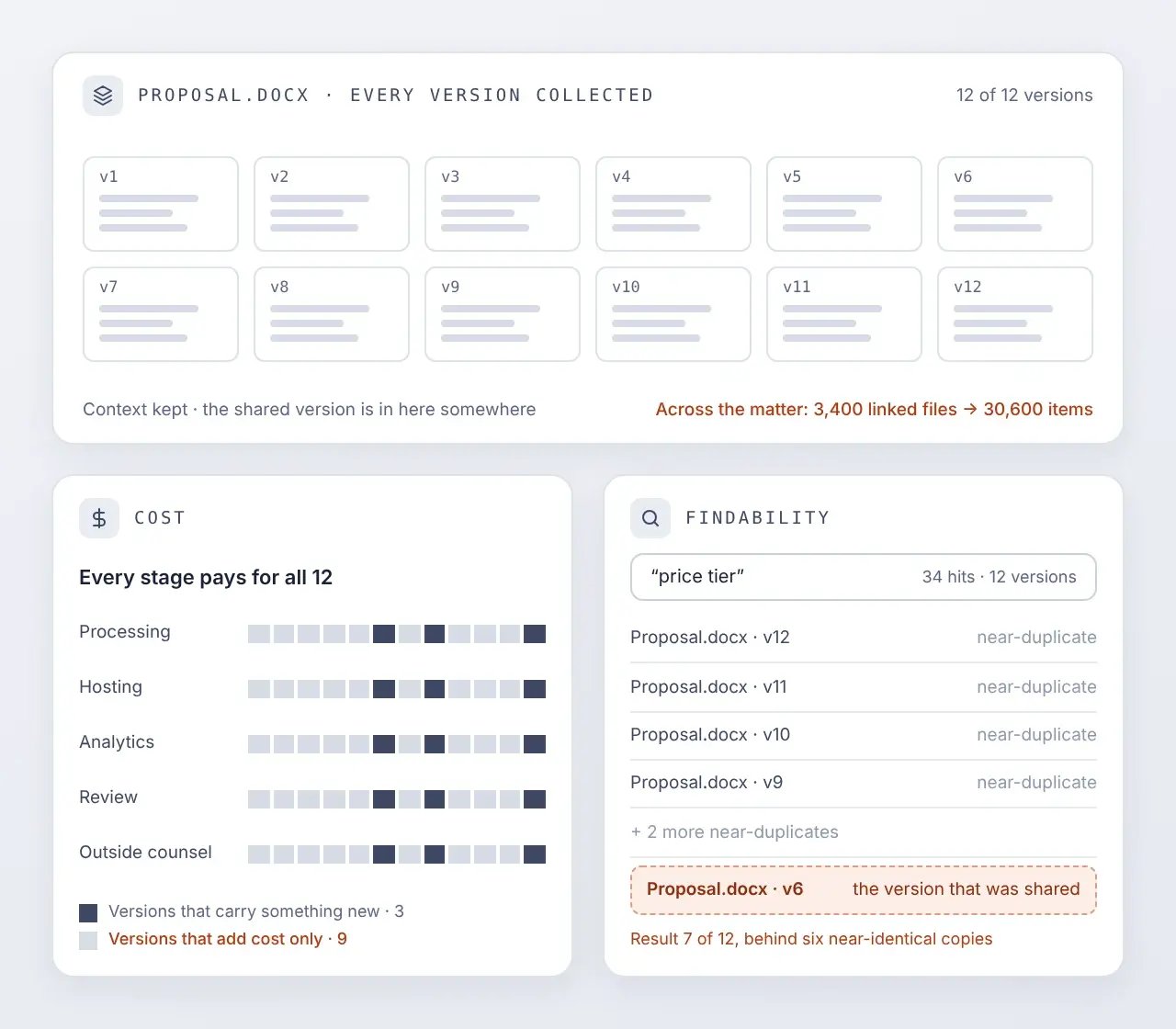
Collecting every available version avoids the context risk, and generates duplicative content at scale.

  • Cost | Adds processing, hosting, analytics, review, and outside-counsel cost across versions that carry nothing new
  • Findability | Makes the versions that actually matter harder to find among the ones that do not
or-every-available-version

Connect versions to events that matter

CaseFusion uses the information surrounding a shared file to support the version decision. That changes the question from which versions exist to which versions are connected to the events at issue.

The version that was shared

A file is shared at 9:00 in the morning, and Version 2 is what exists when the link goes out. A recipient opens it at 11:30 and the file has not changed, so Version 2 is still the version associated with that access.

The version a second recipient opened

The author edits the file that afternoon. A second recipient opens it the next morning, by which point Version 3 is available, so Version 3 is the version associated with that second access.

The current version

The file changes several more times over the following weeks, and the current version is Version 7. Depending on the matter, the legal team may conclude that Versions 1, 4, 5, and 6 are not worth collecting.

Match the version policy to the matter

Different matters need different version strategies, and the technology should follow the strategy the legal team selects for each one.

Shared version

The available version associated with the communication in which the file was shared.

Recipient-access versions

The available versions associated with a recipient's first recorded access, their last during the relevant period, or both.

Selected recipient versions

The versions associated with specific recipients whose interactions bear on the matter.

Relevant-period versions

Selected versions associated with activity during a defined period.

Current version

The present state of the file, where it bears on the matter.

Selected historical versions

Additional versions associated with identified events, changes, or business milestones.

Record what was captured, and what was not

When CaseFusion collects a cloud attachment, it first attempts the version immediately preceding the moment the file was shared. Where that version is no longer available, CaseFusion records that it was not and captures the nearest available version instead.
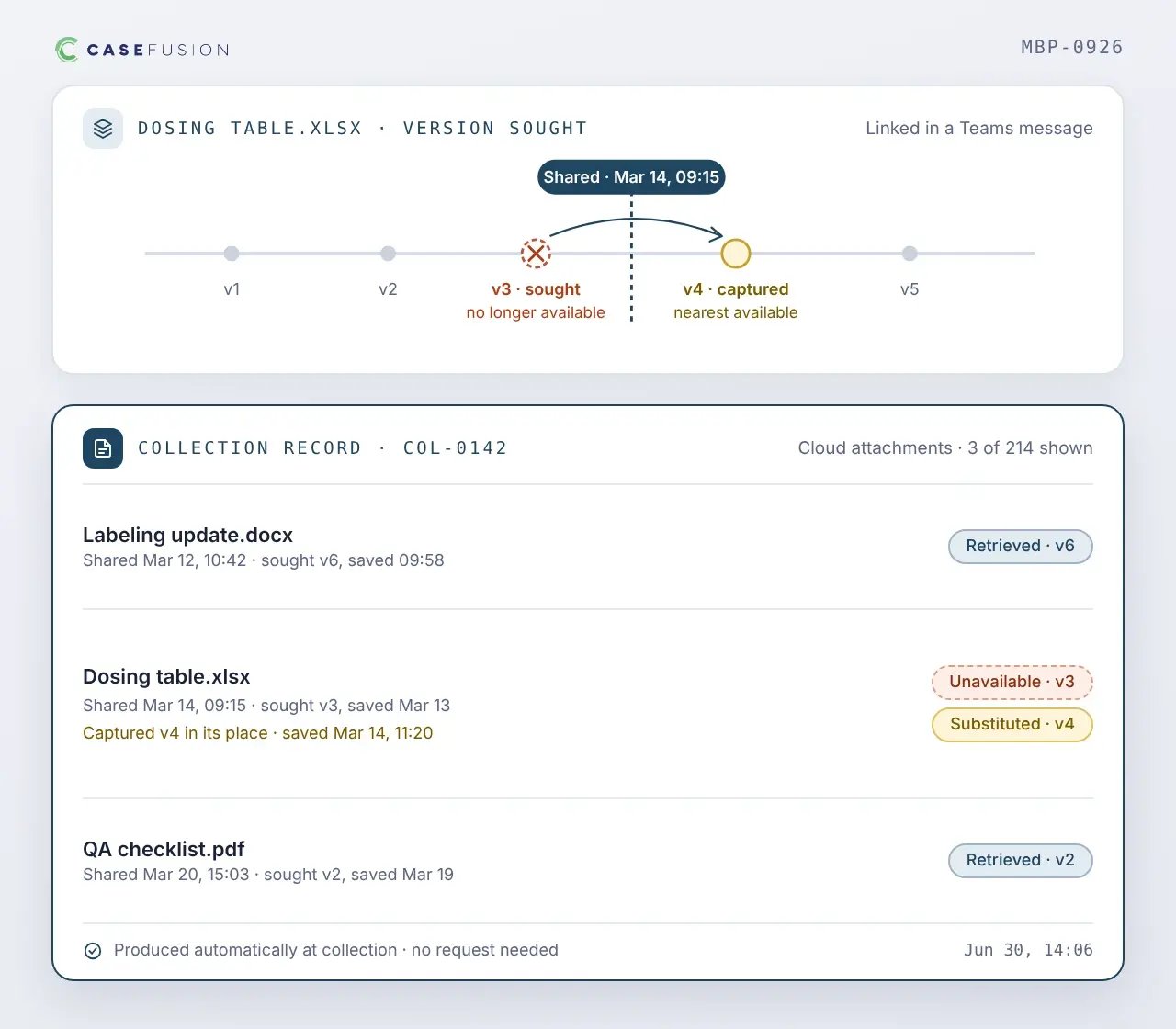
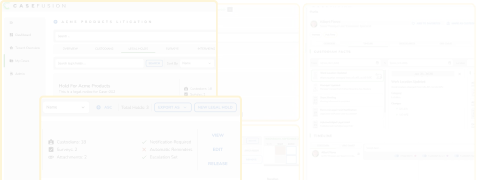
  • Retrieved | Which versions were retrieved
  • Unavailable | Which were sought and could not be
  • Substituted | What was taken in their place
  • Automatic | Produced at collection time, without anyone requesting it
record-what-was-captured

Works alongside Microsoft 365

Microsoft Purview provides native eDiscovery capabilities across Microsoft 365. CaseFusion connects cloud-attachment preservation and version selection to everything else the matter knows.
price-cards-1 microsoft-purview-seeklogo
What Microsoft Purview handles
  • Preservation and search across Microsoft 365
  • Cloud attachment and file version workflows
  • Review and export
  • Results that depend on configuration, retention, and licensing
price-cards-2 Cloudficient__casefusion_dark_rgb-1
What CaseFusion adds
  • The roles the sender, recipients, and file owner held at the tim
  • Custodian scope and repository information
  • Recipient-access events from indexed audit activity
  • Matter-specific version policies and recorded decisions

Cloud attachments & file versions FAQs

What is a cloud attachment in eDiscovery?

A cloud attachment is a link in a communication pointing to a file held in OneDrive, SharePoint, or another collaboration repository, rather than a copy of the file travelling with the message. The same thing is also called a modern attachment, a hyperlinked file, or a linked document. The communication and the file exist separately, and the file can keep changing after it is sent. 

Does preserving an email preserve the file it links to?

Not necessarily. The message may sit inside a held mailbox while the linked file lives in a repository owned by someone else. If that repository falls outside the preservation scope, the file can change, move, or be deleted while the message remains intact. 

Should legal teams collect the current version or every version?

Neither answers the question on its own. The current version may not reflect what existed when the file was shared, and every version generates duplicative volume that makes the significant versions harder to find. The useful question is which versions are associated with events that bear on the matter. 

What is a shared version?

The available version of a file associated with the communication in which it was shared. It answers what existed when the link was sent, which is often different from what exists when the file is collected. 

What does a recipient-access event establish?

It establishes which version of a file was available when a person opened it. It does not establish that they read the document, how much they read, what they understood, or whether they relied on it. 

What happens if the version from the time of sharing is no longer available?

CaseFusion records that the version could not be retrieved and captures the nearest available version instead. The collection carries a record of which versions were retrieved, which were sought and unavailable, and what was taken in their place. 

Does CaseFusion replace Microsoft Purview cloud-attachment capabilities?

No. Microsoft provides native cloud-attachment and file-version capabilities in supported workflows. CaseFusion connects that retrieval to the rest of the matter - historical identity, custodian scope, repository information, recorded access activity, and matter-specific version policy.

Can legal teams still collect all versions when a matter requires it?

Yes. Collecting every available version is one of the supported policies and is sometimes the correct answer, particularly where a discovery agreement or the facts require it. 

Keep messages and their cloud attachments together

See how CaseFusion handles cloud attachments as part of the matter rather than as a separate retrieval problem.