



Skip to content
Contact Us
Background image

Preserve the right ESI with the right preservation method

Legal teams should not have to choose between overly broad holds and relevant ESI falling outside the preservation plan. Preserve broadly against custody, manage hold obligations, then collect against what the matter actually turns on.

Legal hold is a preservation process

A legal hold begins with a decision about who and what must be preserved, and that decision reaches further than most hold workflows account for.

More than a notice list

Current records may not show a person’s role during the relevant period, former employees who held responsibility, or moves between departments.

An incomplete custodian list

Shared repositories, non-custodial sources, and content associated with people outside the initial list may also be in scope.

Relevant ESI left outside

When information is missing, teams compensate with broader holds, more repositories, and longer date ranges.

More data than the matter needs

An overly broad hold retains unnecessary ESI, increases administrative burden, complicates data lifecycle management, and expands the volume eventually collected and reviewed.

Background image

Manage the hold lifecycle

Legal hold is a continuing process. Each stage produces information the next one depends on, and the record of what was decided accumulates as the matter moves.

Identify and notify

Establish who may have relevant ESI and which sources they hold or belong to. Then issue hold communications and track delivery, acknowledgment, responses, and follow-up.

CUSTODIANS Who holds relevant ESI
NOTICES Obligation, scope, dates, ESI types
TRACKING Delivery, acknowledgment, follow-up
Preserve and validate

Apply preservation across the custodial and shared sources in the matter. Maintain records of source locations, hold and collection status, dates applied, data selected, and responsible users.

SOURCES Custodial and shared
RECORDS Locations, status, dates, users
EXCEPTIONS Errors and remediation
Refine and release

Add or remove custodians and sources, revise preservation instructions, and record why the scope changed. When the obligation ends, coordinate release based on legal approval and data-governance requirements.

SCOPE Custodians and sources added or removed
RECORD Why the scope changed
RELEASE Legal approval and governance rules

Custody sets the boundary

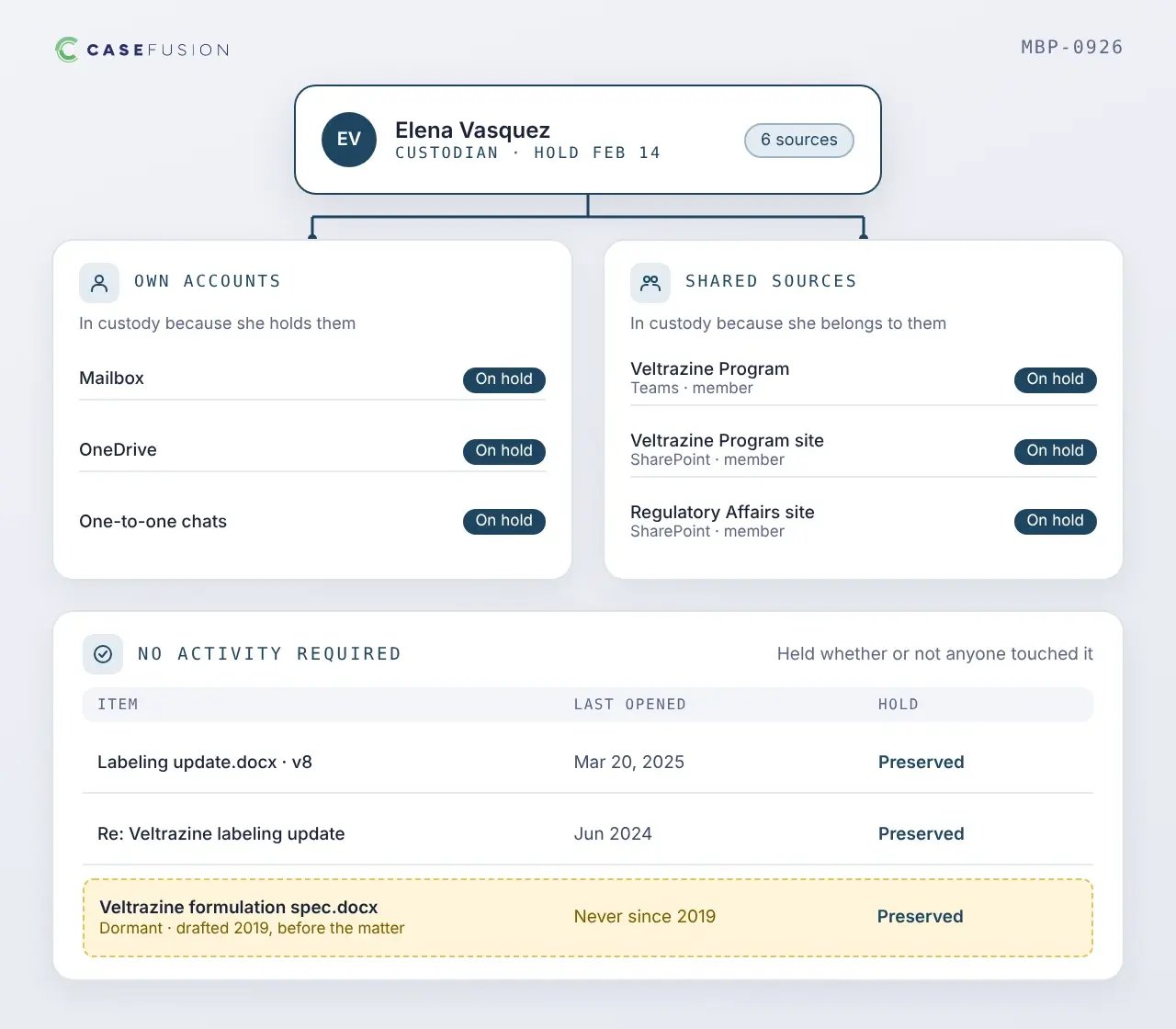
Custody determines what gets protected. A custodian's own accounts are in custody because the custodian holds them, and shared Teams and SharePoint sources are in custody because the custodian belongs to them.

  • Own accounts | Mailbox, OneDrive, and one-to-one chats go under hold because the custodian holds them.
  • Shared sources | Teams and SharePoint sources go under hold because the custodian belongs to them.
  • Dormant content | A specification document drafted years before the matter and never opened since is still preserved.
  • No activity required | Both go under hold whether or not anyone has touched the content recently.
custody-sets-the-boundary

Activity sets the priority

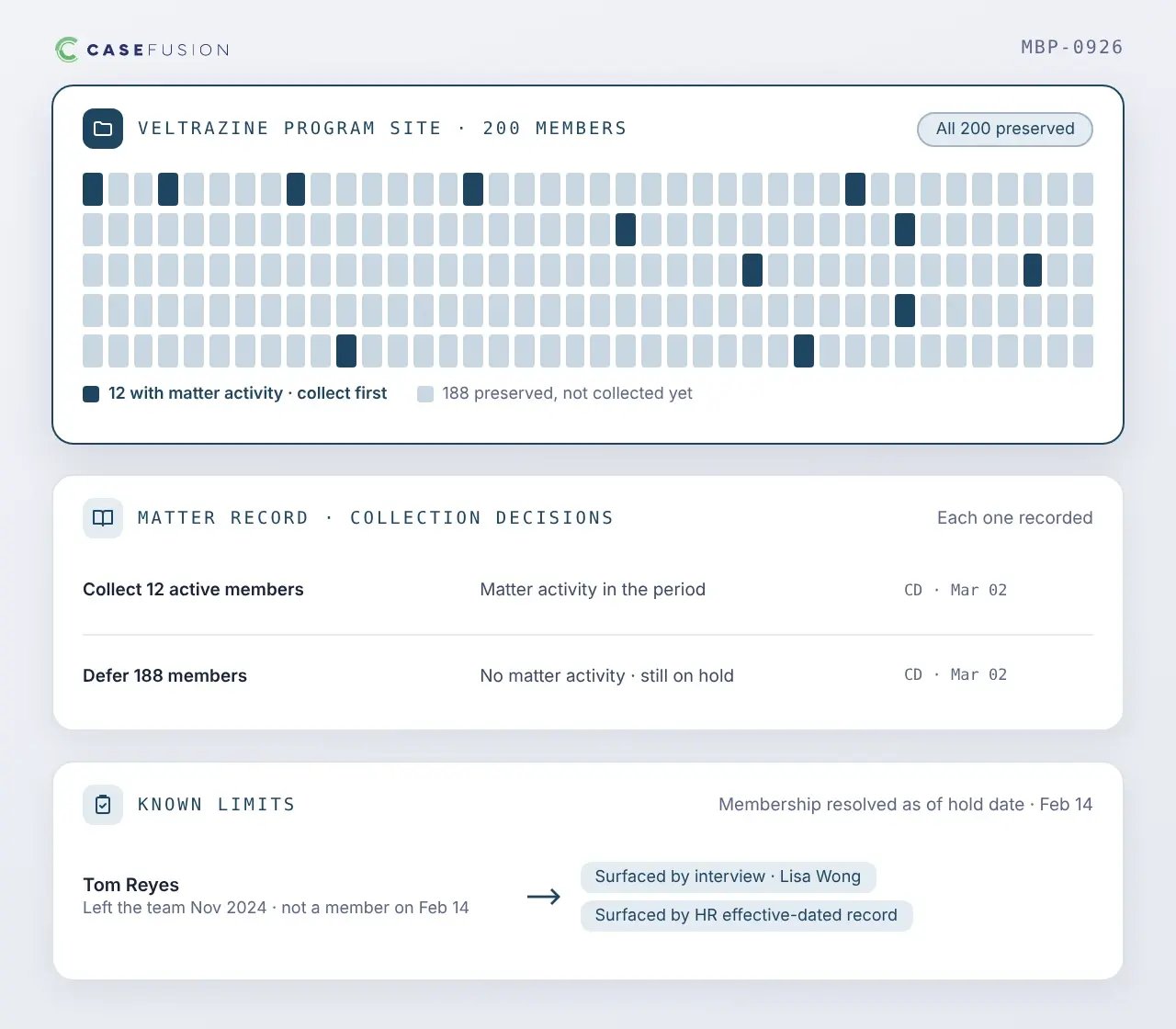
Activity narrows what you collect first. It never narrows what you preserve.

  • Collect what matters first | Where a SharePoint site has two hundred members and a dozen did anything bearing on the matter, collect and review the dozen first.
  • Every exclusion is recorded | The matter record shows when each collection decision was made and on what basis.
  • Known limits | Shared-source membership is resolved as of the hold date, so interviews and effective-dated organizational records surface people who left a team earlier.
activity-sets-the-priority

How the preservation workflow runs

Start with the custodians you know

Most matters open with a list the legal team can assemble from subject-matter conversations and its own knowledge of the organization. That list is where scope begins, and it grows as the matter develops.

Issue notices and preserve in place

Send hold notices with a survey asking custodians to identify data sources and additional people. Then preserve their mailbox, OneDrive, and chats, plus shared Teams and SharePoint sources, through native Microsoft Purview holds.

Refine scope against the data map

The CaseFusion® data map draws on indexed activity and the sources the legal team adds. It shows which preserved sources can be left out of collection and which additional custodians show patterns like those already in scope.

Collect, and capture what messages pointed to

Collection resolves the hyperlinks in collected messages and captures the linked file as it existed when the message was sent, along with versions associated with recipient access where activity context is available.

Interview, and check what you hear

Custodian interviews run against the record. The data map tests what a custodian remembers, effective-dated organizational records confirm who they worked with, and collaboration patterns surface people outside their department.

Repeat as scope changes

New custodians and new sources re-enter at the first step. Each pass is recorded, so the scope carries a history of what changed and why, along with its current state.

Close common preservation gaps

Microsoft 365 preservation is based on the data locations placed on hold. That model works when the legal team knows which locations belong in the matter. Establishing that list early enough is the harder problem.

Linked files in another OneDrive

A held mailbox can contain a link to a file in someone else's OneDrive. Resolve the link and capture the file as it existed when the message was sent, with versions tied to recipient access where activity context is available. 
A site the custodian forgot

A custodian may overlook a departmental SharePoint site. If they belong to it, it is already preserved. Activity establishes whether it matters enough to collect, and the survey and interview surface sites they have since left. 

A role the directory no longer shows

The current directory may not show that someone managed a relevant team during the period. Effective-dated organizational records identify the people and reporting lines of the prior role, and collaboration patterns reach further.

Accounts and systems that change

Accounts are deleted and systems are migrated, divested, or retired while the obligation remains. Track the custodian as a matter record and collect to preserve, so access does not depend on keeping the original source running.

Maintain a record of the preservation process

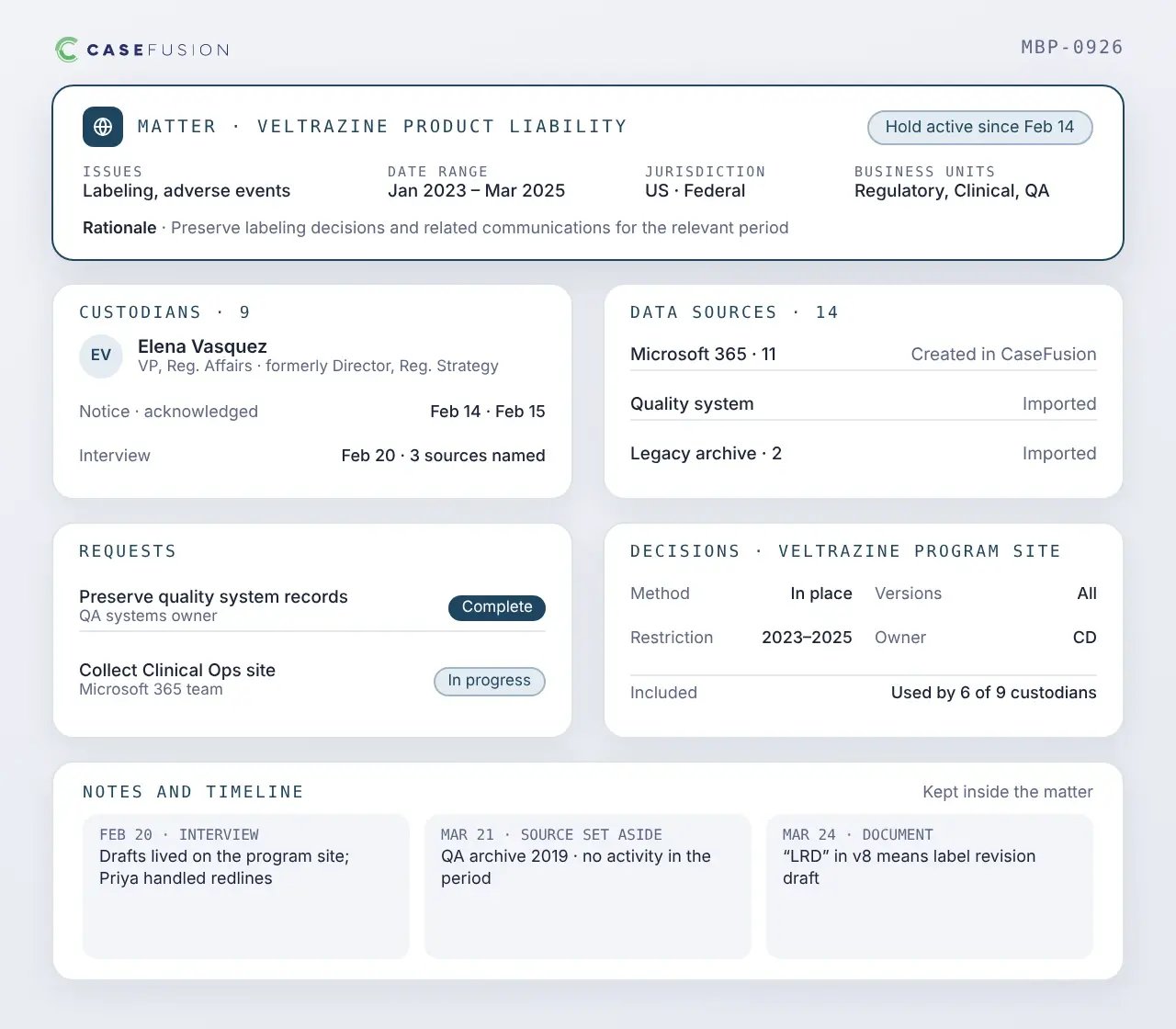
A preservation platform should show whether the plan was implemented and maintained, as well as whether a notice was sent. CaseFusion keeps that record inside the matter.

  • Matter | Relevant issues, date ranges, jurisdictions, business units, and the preservation rationale.
  • Custodians | Current and historical identity, hold status, notice and acknowledgment history, and interview information.
  • Data sources | Microsoft 365 and other sources, created directly in CaseFusion or imported from another system of record.
  • Requests | Preservation and collection tasks routed to the people who own a system and tracked to completion inside the matter.
  • Decisions | Method selected, restrictions, version policy, owner, and the reason for inclusion or exclusion.
  • Notes and timelines | What an interview surfaced, why a source was set aside, and what a document turned out to mean.
maintain-a-record-of-the-preservation-process

Works alongside Microsoft 365 preservation

What Microsoft Purview handles
  • Holds on mailboxes, OneDrive, Teams, groups, and SharePoint
  • Broad or query-based holds
  • Date restrictions, depending on configuration and licensing
What CaseFusion adds
  • Applies holds through the Purview API from one matter
  • Supplies matter information Purview does not hold
  • Reaches linked files and versions outside held locations
  • Keeps a record of every scope decision

Build a preservation strategy around every matter

Bring custodian identification, hold communications, Microsoft 365 in-place preservation, and collect-to-preserve workflows into one coordinated process. See how CaseFusion helps legal teams preserve the right ESI and control discovery cost.