Preserve content and metadata
Carry forward messages, attachments, files, available metadata, timestamps, folder structures, and other source information required at the destination.




Migrate SourceOne email, journal, and file archives to Microsoft 365 or Expireon. ES1Complete coordinates data movement, user workflows, destination preparation, validation, and retirement while maintaining visibility and chain of custody.
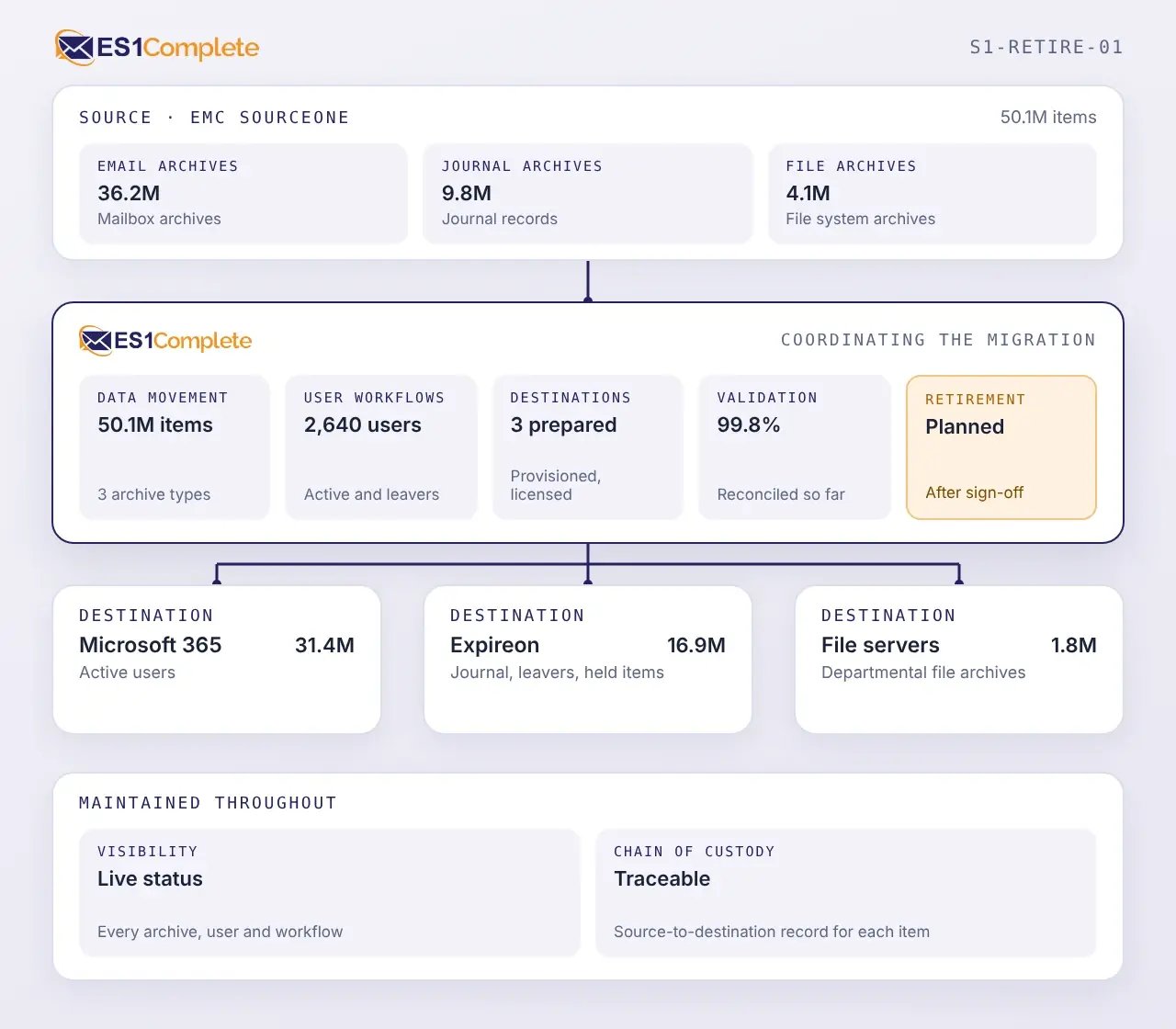
A SourceOne migration must account for the structure of the archive, the people and requirements connected to its contents, and the readiness of each destination.
SourceOne can contain user email, journal, and file archives. Each may have different structures, ownership models, retention requirements, and destinations.
SourceOne environments may span data centers, business units, or regions. Systems, dependencies, and migration scope must be mapped before data begins to move.
Archived information may be associated with current and former employees, shared functions, and accounts that have changed. Those identities must be resolved so information reaches the correct destination.
Accounts, storage, permissions, licenses, and policies must be ready before users or archive populations can transition.
Legal holds, regulatory requirements, records policies, investigations, and other requirements may remain after SourceOne is retired. They must stay connected to the information they govern.
Communication, provisioning, scheduling, transfer, validation, exception handling, and follow-up create numerous dependencies. Managing them through scripts and spreadsheets alone makes status and exceptions harder to track.
EMC SourceOne reached end of support on December 31, 2024. Years of archived information must remain protected and available as the organization moves to supported systems.
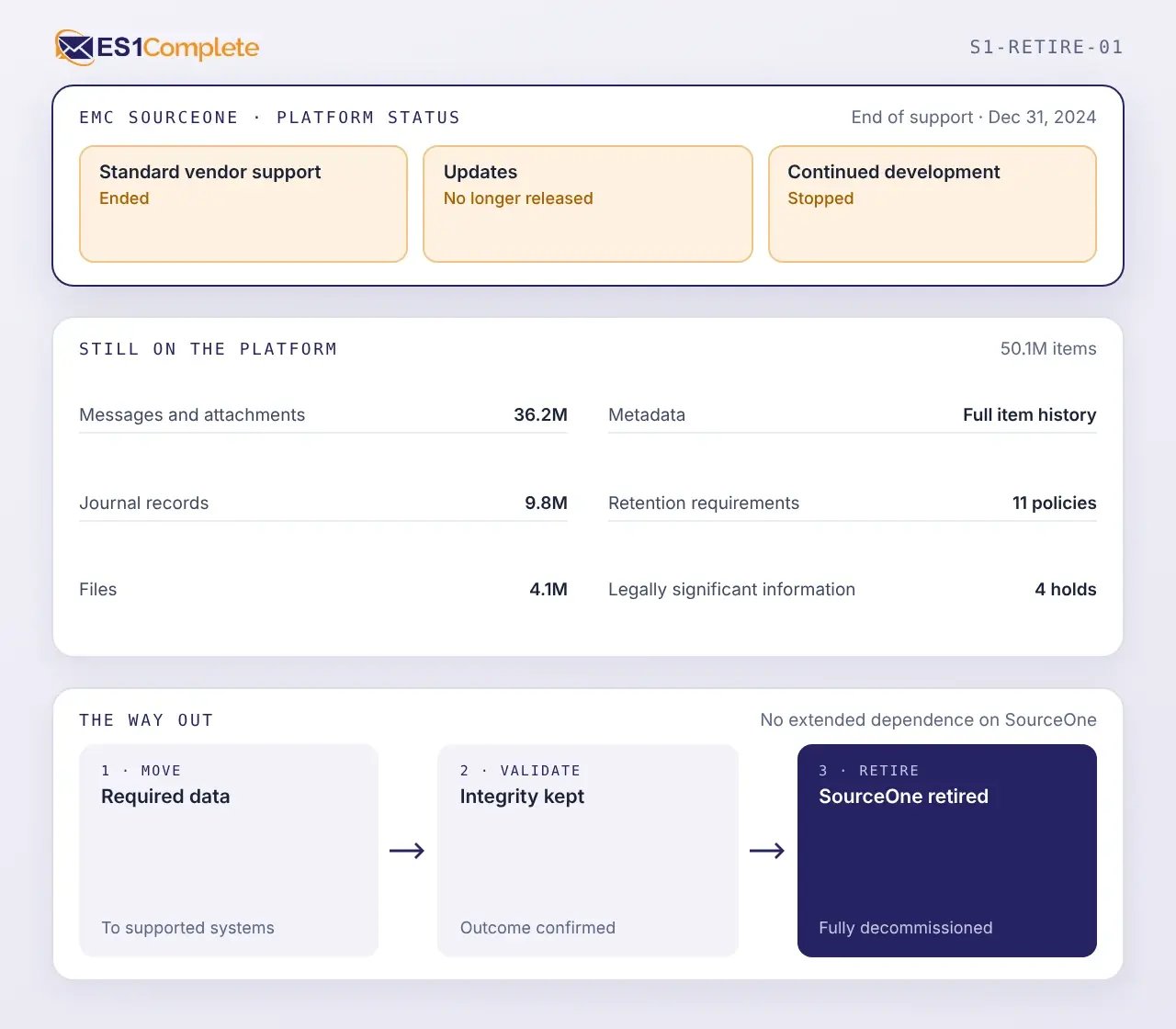
Context discovered at one stage informs the next. New information can always return to refine earlier decisions.
Begin by reviewing the SourceOne environment and building a view of the archive data included in the migration.
Map archived information to its intended users and locations, then define the workflows for each population.
Complete the required preparation before moving approved SourceOne data to its defined destination.
Validate migration outcomes and agree how outstanding exceptions will be treated before retirement proceeds.
A migration succeeds when information remains complete, traceable, and usable after SourceOne is retired. ES1Complete carries source context forward, records migration outcomes, and keeps exceptions visible throughout the transition.
Carry forward messages, attachments, files, available metadata, timestamps, folder structures, and other source information required at the destination.
Preserve journal records with the metadata and relationships needed for retention, search, and future investigation.
Map archived information associated with active users, former employees, and shared functions to the correct destination identity or approved target.
Connect source records to their destination results so migrated, excluded, failed, and unresolved items can be traced.
Process email, journal, and file archives according to destination requirements rather than forcing every population through the same migration path.
Identify inaccessible content, identity conflicts, unsupported items, and processing failures for investigation before completion.
Use reusable steps for provisioning, communications, license assignment, migration, validation, exception handling, and follow-up.
Apply different workflows to email, journal, and file archives, or configure them by business unit, region, user group, or destination.
Track users and archive populations through their assigned workflows while maintaining a project-level view of progress and exceptions.
Automate repeatable activities and handoffs so teams do not have to coordinate each user or population manually.
Cloudficient specialists oversee progress, investigate issues, and guide the approved migration plan through completion.
Protect information through encrypted transfer, authorized access, controlled processing, and documented handling throughout the migration.
ES1Complete maintains a record of how each user and archive population progresses through the migration. This provides evidence of what has been completed, what remains, and where additional action is required.
 01
Compare approved source populations with destination results to confirm what was processed. Use available fingerprints and migration records to support traceability from SourceOne to the destination.
02
Identify items, users, and archive populations that could not be processed as expected, including their current resolution status.
03
Maintain a clear view of migrated and remaining populations while SourceOne and the target environment operate in parallel.
04
Confirm that approved data has reached its destination and that unresolved exceptions have an agreed treatment before decommissioning proceeds.
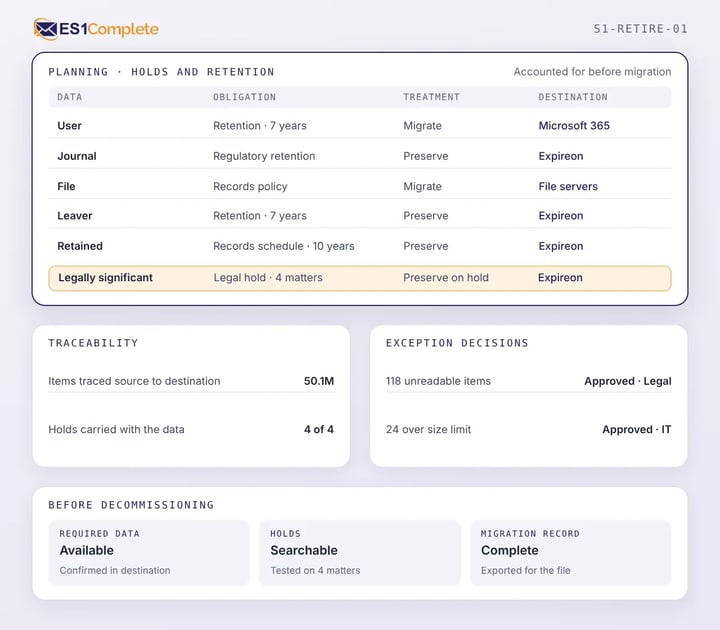
SourceOne may hold information subject to legal hold, regulatory retention, records policies, audits, investigations, or other continuing obligations. These requirements need to remain supported through migration and after the source platform is retired.
Cloudficient helps organizations:
Move user archive and appropriate file archive data into Exchange Online, SharePoint, or OneDrive when employees need continued access. Preparation may include identity mappings, target locations, permissions, licenses, and migration schedules.
Move journal, historical, leaver, or legally significant data into Expireon when it must remain governed and accessible outside an active user environment. Preparation may include retention, historical ownership, access, and disposition requirements.
Use Microsoft 365 and Expireon together when SourceOne contains a mixture of active-user content and information with different legal, retention, or operational requirements. ES1Complete applies the approved treatment to each archive population.
ES1Complete® helps organizations move required operational information, validate the outcome, and retire SourceOne with a clear record of the transition.
Move required operational information into supported destination systems and validate the results before SourceOne is decommissioned.
Retire the servers, storage, networking, maintenance, and administrative work required solely to keep the archive accessible.
Automate repeatable work across communications, provisioning, licensing, migration, validation, and exception handling so internal teams can focus on approvals and issues.
Maintain source-to-destination traceability, validation results, exceptions, and project decisions so teams can see what moved, what did not, and why.

Assess the source environment, prepare each destination, automate the migration workflow, and retire SourceOne with a verified record of the outcome.