Identity and accounts
Confirm target identities, account mappings, authentication requirements, group memberships, and ownership relationships.




Automate and coordinate onboarding large user populations to Microsoft 365. Onboarding 365 Complete progresses each user through the right workflow while maintaining centralized visibility, communication, auditability, and project control.
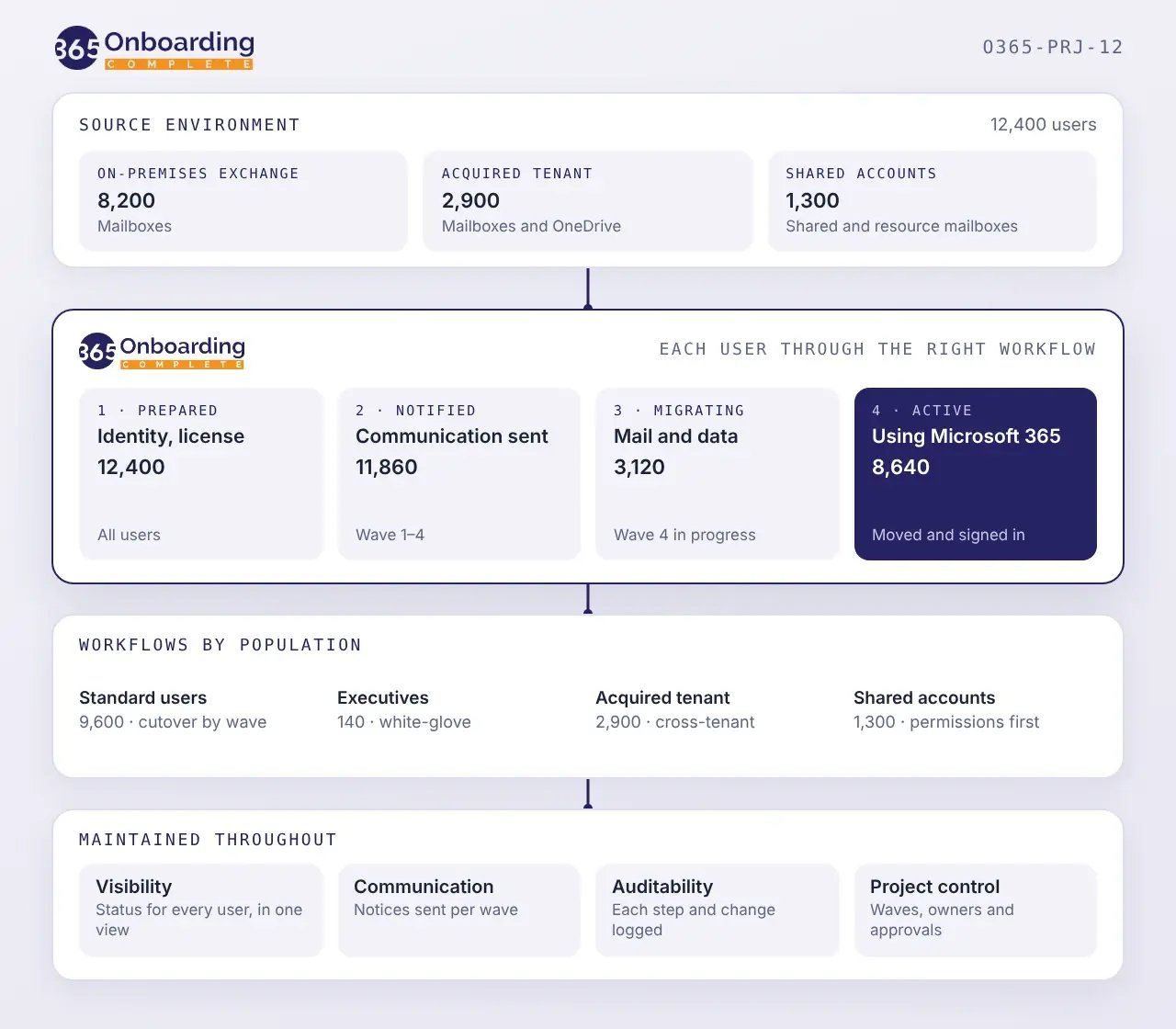
Microsoft 365 onboarding coordinates people, identities, licenses, services, data, communications, and cutover. A delay or exception in one area can affect the user or population connected to it.
Account provisioning, licensing, service configuration, data migration, communication, and cutover must come together for each user.
Active employees, former-employee data, executives, shared accounts, and regional groups may require different timing, communications, treatment, and destinations.
Source identities must map to the correct target accounts, licenses, groups, permissions, and services before data moves.
Users need clear information about what is changing, when action is required, and what to expect before, during, and after onboarding.
During phased onboarding, the source environment and Microsoft 365 may operate in parallel. Teams need a current view of who has moved, who remains, and which dependencies are still active.
Identity conflicts, missing licenses, provisioning issues, and migration failures can block individual users. Each exception must be recorded, routed, and resolved without losing sight of overall progress.
Microsoft 365 onboarding at scale involves more than transferring mailbox data. Users, identities, licenses, permissions, communications, and dependencies need to be addressed in the right order, often along different paths.
What Onboarding 365 Complete helps you do
Onboarding 365 Complete combines cloud-native technology with specialist managed delivery.
Start with a clear view of the source environment, then group users into onboarding profiles before any data moves.
Prepare the target environment and define how each user group will progress through the project.
Keep users informed as each one progresses into Microsoft 365.
Finish with confirmed outcomes and an approved cleanup of the previous environment.
Associate each source user with the appropriate Microsoft 365 identity, mailbox, license, group, and services.
Migrate messages, attachments, calendar entries, contacts, tasks, notes, available metadata, timestamps, and folder structures through the approved Microsoft migration approach.
Use different workflows for active users, former employees, shared accounts, executives, business units, or other defined groups.
Track provisioning, licensing, policies, communication, migration, application readiness, and other activities linked to each user.
Surface mapping issues, migration errors, missing prerequisites, and incomplete user tasks for investigation and resolution.
Record how each user progressed through the workflow, including completed steps, exceptions, interventions, and final status.
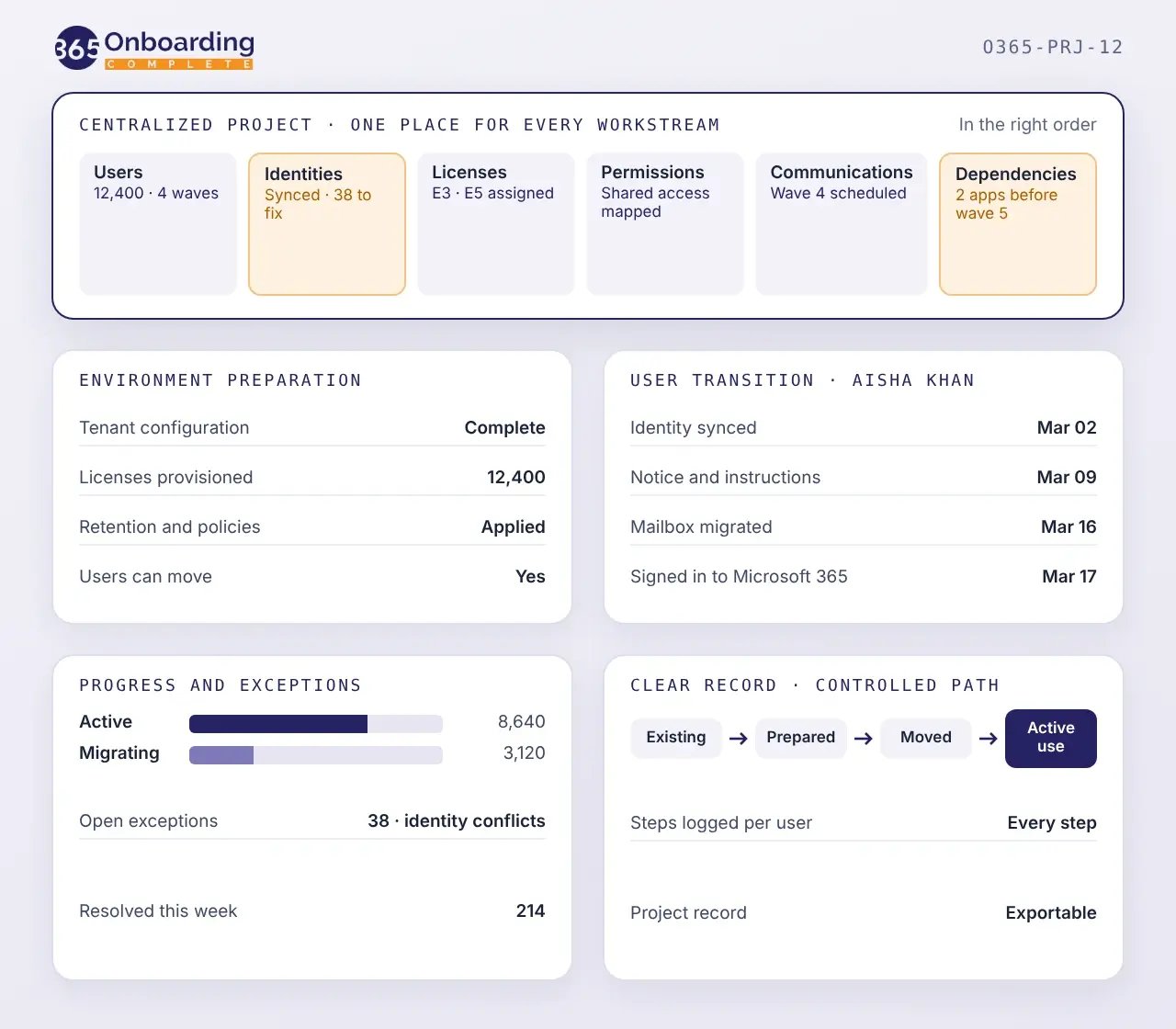
Onboarding 365 Complete maintains a detailed view of progress across the project.
 01
Confirm that each user has completed the required provisioning, licensing, communication, migration, validation, and readiness activities.
02
Compare approved source populations with Microsoft 365 outcomes to confirm who and what has been migrated, while maintaining a clear view of users operating in the source environment and those active in Microsoft 365.
03
Identify incomplete prerequisites that prevent a user or group from progressing to the next stage, and surface technical issues, incomplete tasks, migration errors, and other exceptions with their current resolution status.
04
Retain an audited record of onboarding activity, decisions, exceptions, interventions, and final outcomes.
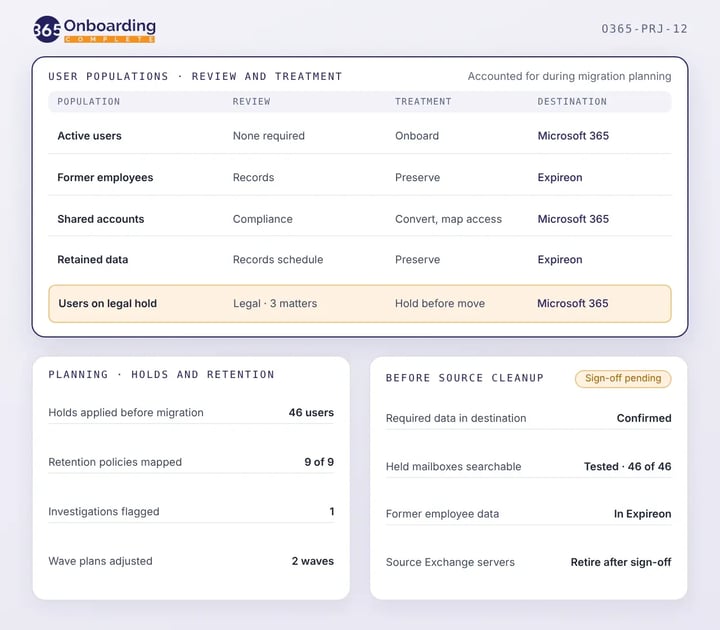
Information associated with users may be subject to legal holds, retention policies, records requirements, investigations, or other continuing obligations when Microsoft 365 onboarding begins. Those obligations must remain supported as accounts, data, identities, and services change.
Cloudficient helps organizations:
Microsoft 365 needs to be ready for each user population before onboarding begins. Onboarding 365 Complete coordinates the technical and operational dependencies required to progress users into the target environment
Confirm target identities, account mappings, authentication requirements, group memberships, and ownership relationships.
Assign the appropriate Microsoft 365 licenses and services according to the user’s approved onboarding profile, and confirm which mailbox data, settings, or other approved information will move with each user.
Prepare the Microsoft hybrid technology and connectivity required to support compatibility and coexistence during migration.
Configure required access, security, retention, and other applicable policies before users become active in Microsoft 365.
Provide the communication, instructions, applications, and support users require before cutover.
Define the technical, data, policy, and user requirements that must be complete before each user or group moves into production.
Manage users, groups, workflows, dependencies, communications, and migration status through one coordinated process.
Automate repetitive activities across provisioning, licensing, communication, migration, and validation, allowing internal IT to focus on Microsoft 365 strategy, adoption, and business priorities rather than running every migration task.
Give users timely, relevant information about what is changing and any actions they need to complete.
Surface missing prerequisites and exceptions before they disrupt a cutover or hold back an entire migration group.
Progress users into the target environment so the organization can begin using the Microsoft 365 services it has invested in.
Finish with an audited record of how each user and group moved through the onboarding project.

Prepare the target environment, coordinate every dependency, communicate with users, and complete the transition through one fully audited program.