Legal hold software that connects people, data and preservation
Manage legal holds and coordinate preservation across Microsoft 365 with greater visibility into custodians, data sources, and changing matter scope. CaseFusion brings hold management, historical context, and preservation workflows together to support defensible decisions from initial identification through release.
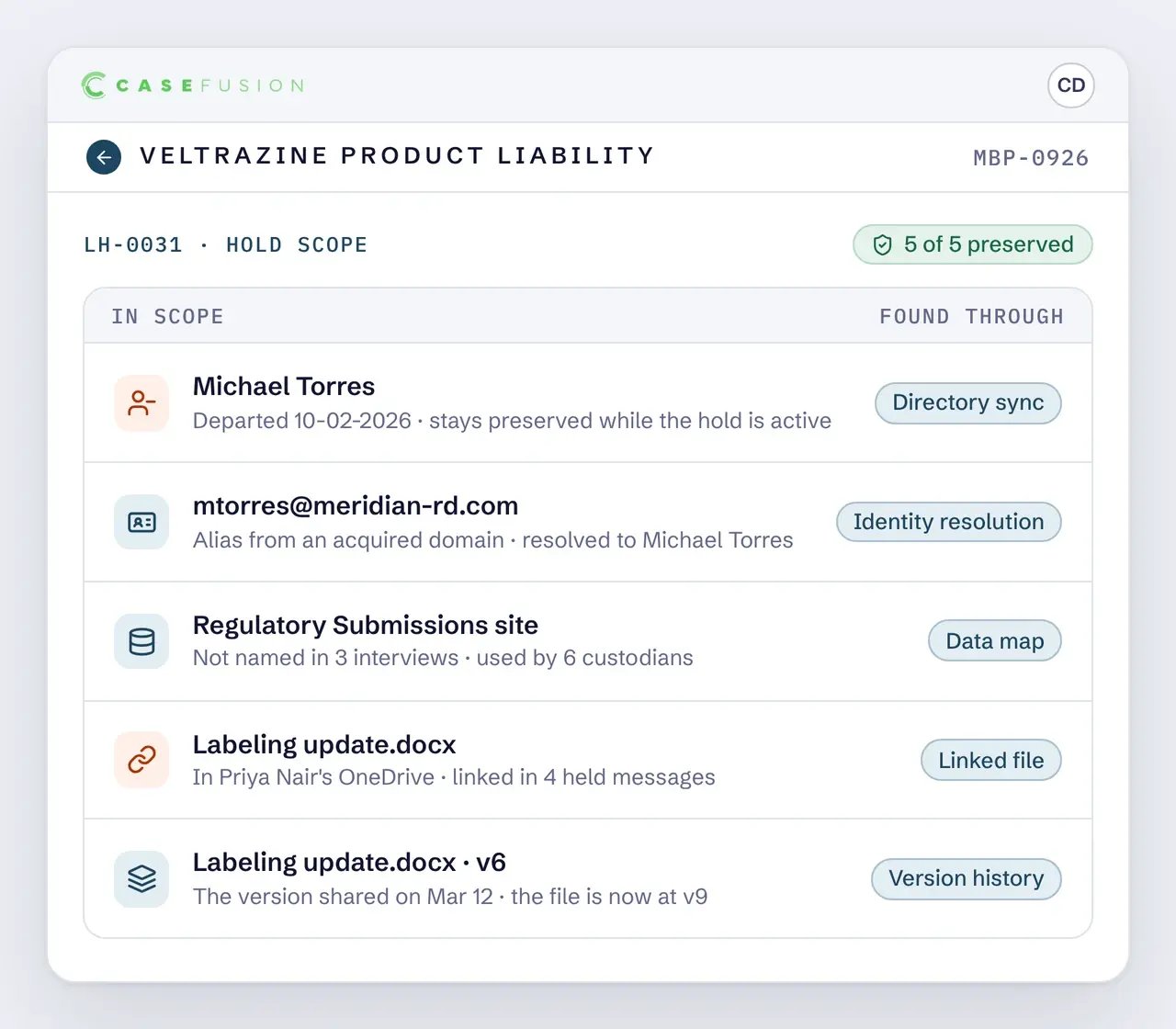
A legal hold must account for the people, accounts, and data sources relevant to the matter. In Microsoft 365, that scope can extend beyond current custodians and their individual accounts. Changes in identity, shared repositories, and linked documents can leave relevant ESI outside the initial preservation scope.
Where legal hold scope can fall short:
Former or transferred employees | A relevant custodian has changed roles, moved departments, or left the organization since the events occurred.
Historical accounts and aliases | An email address or account used during the relevant period is no longer associated with the custodian's current identity.
Shared repositories | A SharePoint site contains potentially relevant information but was not identified through the initial custodian interviews.
Linked cloud documents | A document shared through Teams or email is stored in another user's OneDrive or a shared repository outside the named custodian's account.
CaseFusion connects available historical identity, activity, and repository information to help legal teams identify relevant custodians and sources, inform preservation scope, and document how that scope changes throughout the matter.
Identify custodians across changing roles and identities
Identifying relevant custodians requires understanding who people were, which accounts they used, and where they worked during the period at issue. CaseFusion connects available historical identity and organizational information to help legal teams identify potential custodians, resolve multiple accounts to individuals, and make more informed matter-scoping decisions.
Identities change over time
Employees change roles, departments, managers, names, and email addresses. These changes can make it difficult to connect historical activity and information to the right person during an investigation.
Organizational changes add complexity
Acquisitions, reorganizations, and employee transitions introduce new identities, directories, and reporting relationships. A single individual may have multiple accounts across current and former environments.
Current directories miss historical context
Today's directory describes the organization as it exists now. It may not show who held a particular role, managed a team, or belonged to a business unit when the relevant events occurred.
Resolve the person behind the account
CaseFusion uses available identity information from Microsoft Entra ID, HRIS platforms, and imported directories to associate accounts with individuals, including historical identities from acquired or retired environments.
Connect accounts and historical identities
Associate relevant accounts, aliases, and email addresses with the same individual. Deterministic matching uses defined identity attributes, while ambiguous matches can be routed for review rather than automatically combined.
Build a more complete custodian population
Use resolved identities and historical organizational relationships to identify potential custodians who may be missed when relying on current employee records alone. Support more informed identification decisions, particularly for former employees, acquired populations, and people whose responsibilities have changed.
Legal hold in a Microsoft 365 environment
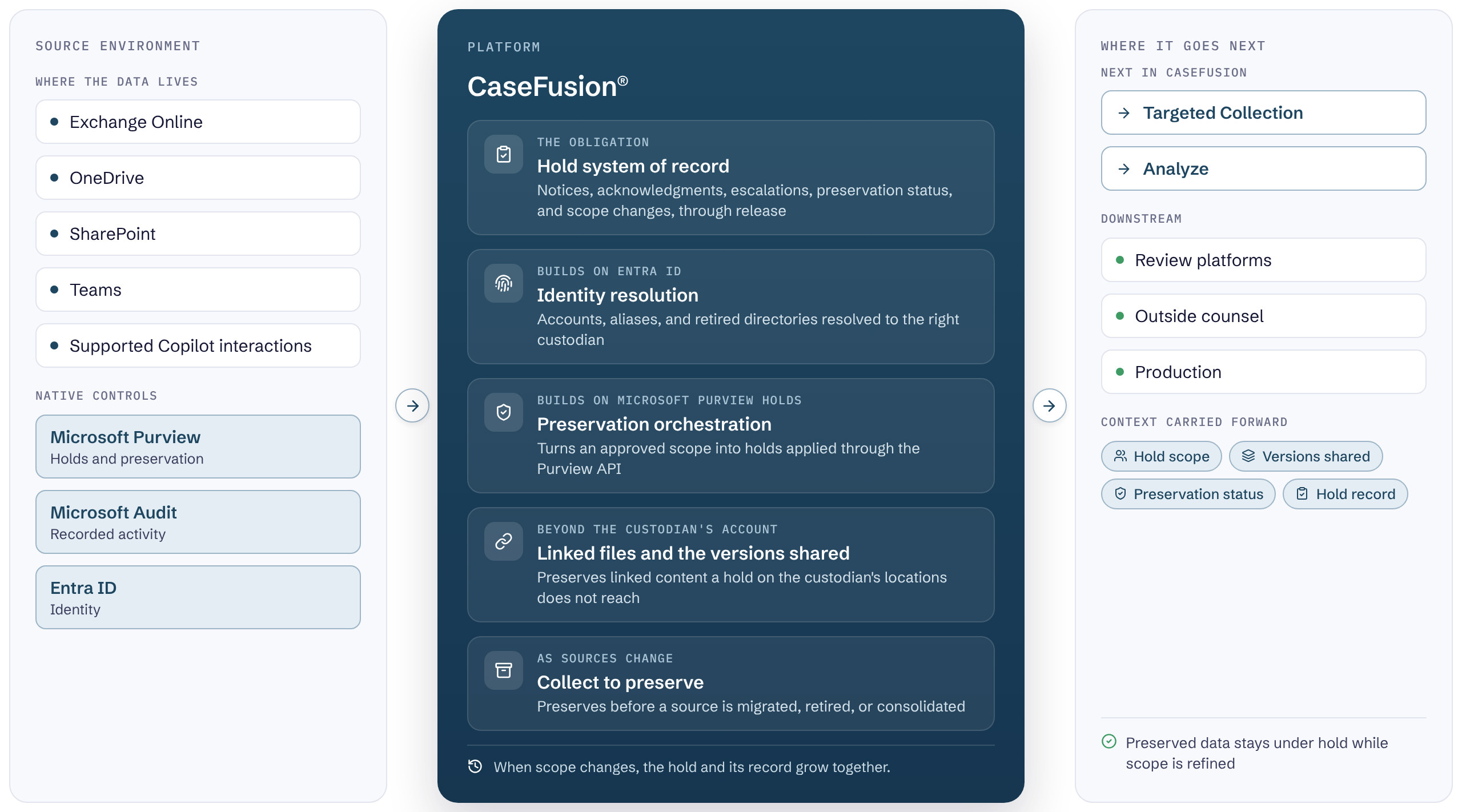
Most organizations running holds in Microsoft 365 already use its native capabilities. CaseFusion adds the system of record for the obligation, identity resolution, orchestration of preservation actions, and reach into shared and linked content.
Legal hold in a Microsoft 365 environment.
Most organizations running holds in Microsoft 365 already use its native capabilities. CaseFusion adds the system of record for the obligation, identity resolution, orchestration of preservation actions, and reach into shared and linked content.
Preserve cloud attachments and shared resources
Custodian boundaries do not define where relevant ESI lives.
The linked document
A custodian receives a Teams message containing a link to a document. The document is in someone else's OneDrive, or on a SharePoint site the custodian is not a member of.
What the hold misses
Preserving the custodian's account preserves the message. It does not preserve the linked document, and when reviewers discover it is missing, the version that was shared may have been overwritten.
Linked content preserved
CaseFusion identifies supported linked and shared content associated with the preservation scope and preserves it alongside the custodian's own sources.
Protect broadly, collect precisely
For shared sources, preservation is applied broadly while collection and later analysis stay precisely scoped, so protecting more does not mean collecting more.
One workflow from notice through release
Legal hold is a continuing process that requires coordination as custodians, data sources, and preservation obligations change. CaseFusion connects identification, notification, preservation, validation, and release in one workflow, maintaining the supporting information and decisions throughout the matter.
Identify
Identify relevant custodians and data sources using available identity, organizational, and activity information.
Account for changes in roles, identities, and access over time to establish a more informed starting scope.
Notify
Issue legal hold notices with clear preservation instructions, including relevant subject matter, date ranges, and information types.
Track delivery, acknowledgments, responses, and follow-up activities in the matter record.
Preserve
Apply the preservation approach appropriate to each source and matter requirement. Preserve information in place through supported Microsoft 365 controls or collect selected ESI into a controlled environment when additional control is needed.
Both approaches can be coordinated within the same matter.
Maintain supporting records so legal teams can understand what preservation actions were taken, when they occurred, and where further attention may be required.
Refine
Update custodians, sources, date ranges, and preservation instructions as new information emerges.
Record changes to matter scope and the reasons behind them while maintaining visibility into existing preservation obligations.
Release
Coordinate hold release when the applicable preservation obligation ends.
Document release decisions, notify affected custodians, and manage associated preservation actions while accounting for any other continuing legal or retention requirements.
Scope changes are the normal case rather than the exception. A new custodian, a repository that surfaces late, an obligation that widens: each re-enters at Identify and moves through the same stages, without restarting the matter or disturbing what is already preserved. The hold grows, and the record grows with it.
One auditable system of record
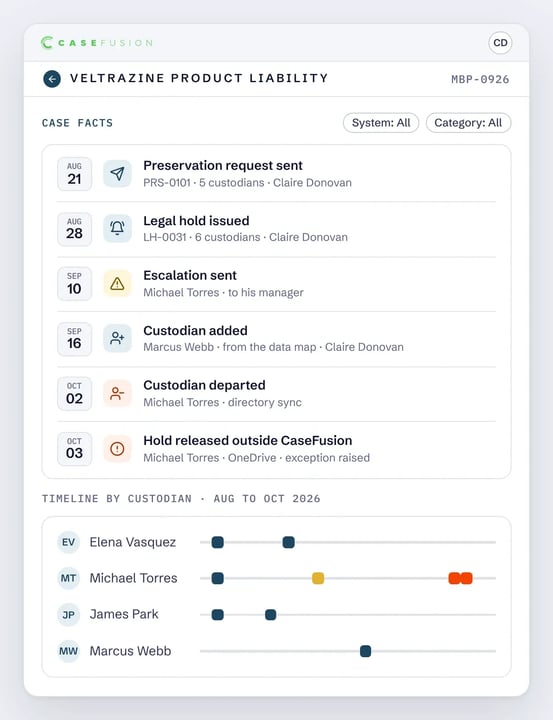
CaseFusion is the system of record for the hold obligation. Everything that happens to a hold happens in one place and stays there.
What is recorded
Custodians and their identities
Preservation status by source
Hold notices and versions
Scope additions and removals, with reasons
Acknowledgments and reminders
Releases
Escalations
Communication history
Interviews and responses
Administrative activity
Because the record accumulates as the matter runs, a legal team can see what happened without reassembling it afterward from systems that were never meant to hold it. Scope has a history rather than only a current state, which is what makes a decision explainable years later, to someone who was not there when it was made.
A complete hold record gives you answers long after the decisions were made.
CaseFusion legal hold FAQs
Does CaseFusion do legal hold?
Yes. CaseFusion is the system of record for the hold obligation: notices, acknowledgments, reminders, escalations, interviews and responses, preservation actions and status, scope changes and the reasons for them, and release.
How does CaseFusion preserve data under legal hold?
Preservation is applied through the Microsoft Purview API across each custodian's own sources and the shared Teams and SharePoint sources they belong to. Where a matter calls for a controlled environment, or where a source is being migrated, retired, or consolidated, CaseFusion collects to preserve. Both strategies can run inside one matter.
Does a legal hold preserve documents shared by link?
Not on its own. A hold applied to a custodian's data locations preserves those locations, and a document referenced by a link often sits in a repository the custodian does not own. CaseFusion identifies supported linked and shared content associated with the preservation scope and preserves it alongside the custodian's own sources.
How does CaseFusion handle custodians who have left or changed roles?
Identity resolution draws on effective-dated identity from Entra ID, HRIS platforms, and other imported directories, including those inherited from acquisitions and from retired systems. Separate accounts, aliases, and addresses are associated with one person, and ambiguous matches are held for review rather than merged.
What happens when the scope of a hold changes?
Custodians and sources are added or removed, preservation changes with the scope, and the change is recorded with the reason for it. Scope has a history rather than only a current state.
Is legal hold sold separately from CaseFusion?
No. CaseFusion is licensed and delivered as one platform under consumption-based pricing. Legal hold is a capability area within it, not a separate product, edition, or module.
Modern data requires modern legal hold. Build a preservation strategy around every matter.