Preserve email and file content
Carry forward archived messages, attachments, files, and other supported content included in the approved migration scope.




Migrate Enterprise Vault mailbox, journal, and file archives to Microsoft 365 or Expireon. EVComplete® coordinates the people, data, systems, and decisions the migration requires while maintaining visibility, auditability, and chain of custody.
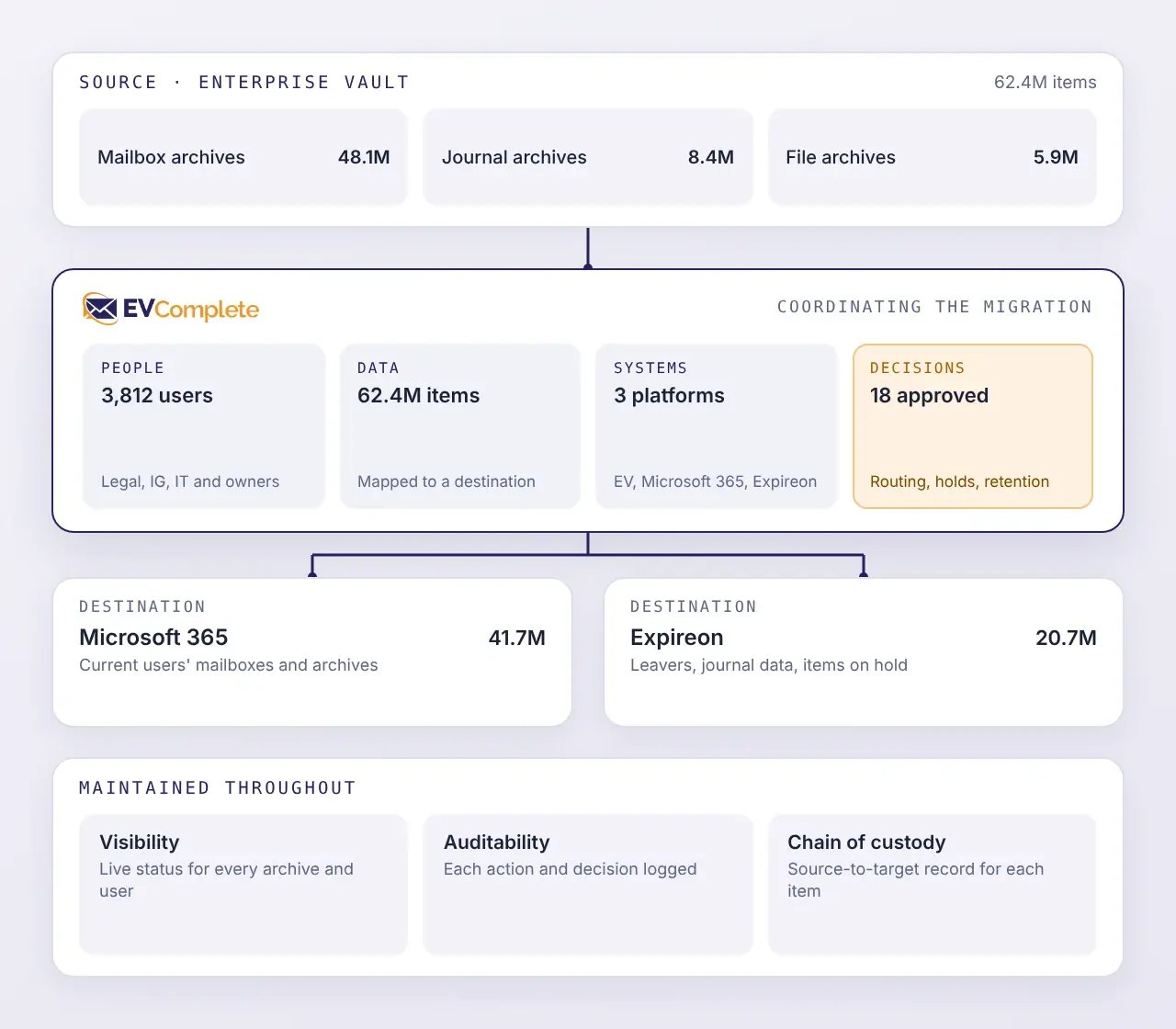
An Enterprise Vault migration must account for the structure of the archive, the people and requirements connected to its contents, and the readiness of each destination.
Enterprise Vault may contain mailbox, journal, and file archives. Each may have different structures, ownership models, retention requirements, and target destinations.
Archived information may be associated with current and former employees, shared functions, and accounts that have changed. Those identities must be resolved so each archive population reaches the correct destination.
Microsoft 365 accounts, permissions, licenses, storage locations, and other prerequisites must be ready before individual users or archive populations can move.
Archive data may remain subject to legal holds, retention policies, regulatory requirements, investigations, or other obligations after Enterprise Vault is retired. Those requirements must stay connected to the information they govern.
Enterprise Vault migrations may encounter inaccessible items, inconsistent metadata, mapping issues, damaged content, unsupported items, or destination restrictions. Each exception needs a controlled path to resolution.
User communications, provisioning, licensing, scheduling, migration, validation, exception handling, and follow-up create many interdependent tasks. Managing them through scripts and spreadsheets alone makes progress and exceptions harder to track.
Successful migration requires more than moving archive content to a new destination. The information must remain traceable and usable after Enterprise Vault is retired.
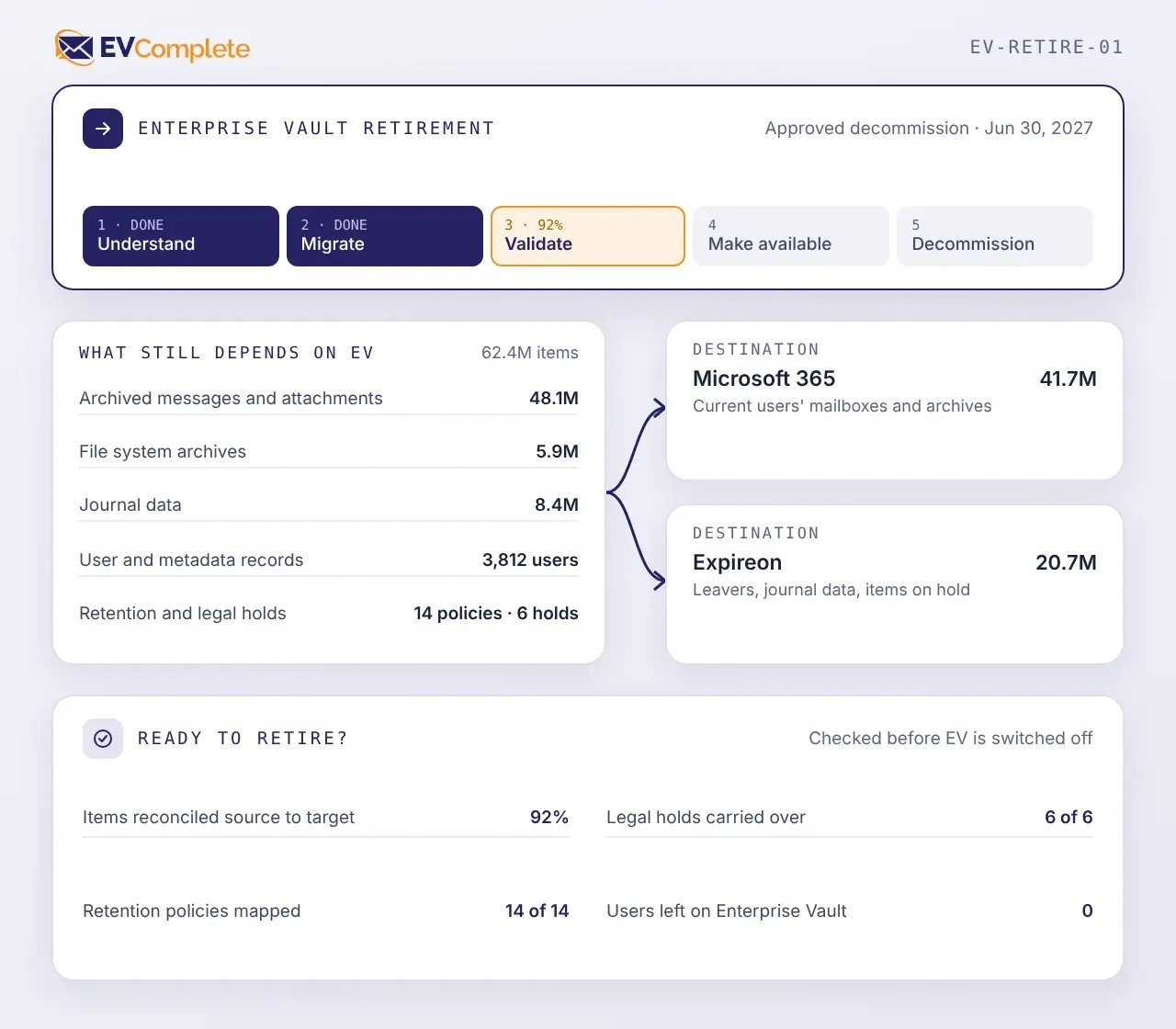
Information established at one stage informs the next. New findings can also return to refine earlier decisions.
Begin by reviewing the Enterprise Vault environment and building a view of the archive data included in the migration.
Associate archive data with its intended users and destinations, then define the workflow for each population.
Complete the required preparation before moving approved archive data through the defined workflows.
Validate the migration outcomes and resolve or document exceptions before retirement proceeds.
A migration succeeds when archived information remains usable after Enterprise Vault is retired and its path to the destination can be explained. EVComplete carries available source information forward and records how each item was handled.
Carry forward archived messages, attachments, files, and other supported content included in the approved migration scope.
Maintain available metadata and timestamps needed to identify and understand migrated content at its destination.
Retain journal records with the available metadata and source information needed to support applicable retention, search, compliance, and investigation requirements.
Preserve available folder structures according to the approved migration policy and the requirements of the destination.
Use item fingerprints and migration records to connect Enterprise Vault source items to their resulting destination outcomes.
Handle duplicate content according to the project’s approved migration policy rather than allowing uncontrolled duplication to shape the target environment.
EVComplete uses Cloudficient’s cloud-native technology to automate and orchestrate the migration project. Workloads scale to project requirements without a large fixed deployment of on-premises migration servers.
Use reusable steps for migration activity, user communication, provisioning, license assignment, verification, exception handling, and follow-up.
EVComplete provides preconfigured workflow steps for migration activity, user communication, provisioning, license assignment, verification, exception handling, and other project requirements.
Create different workflow templates for business units, locations, archive types, user groups, or migration phases.
Progress each user or archive population through the appropriate workflow while maintaining centralized visibility across the wider project.
Reduce repetitive manual tasks by coordinating communications, provisioning, licensing, migration activity, validation, and follow-up through the workflow.
Cloudficient provides the migration expertise and project oversight needed to maintain progress, address exceptions, and carry the approved project through to completion.
EVComplete records how each user and archive population progresses through the migration workflow. This shows what has been completed, what remains outstanding, and where intervention is required.
 01
Compare approved source data with destination outcomes to confirm what migrated. Maintain traceability as information moves from Enterprise Vault to its approved destination.
02
Identify items, users, or archive populations that could not be processed as expected and document their current resolution status.
03
Maintain a clear view of migrated and remaining populations while Enterprise Vault and the target environment operate in parallel.
04
Confirm that approved data has reached its intended destination and that unresolved exceptions have an agreed treatment before Enterprise Vault retirement proceeds.
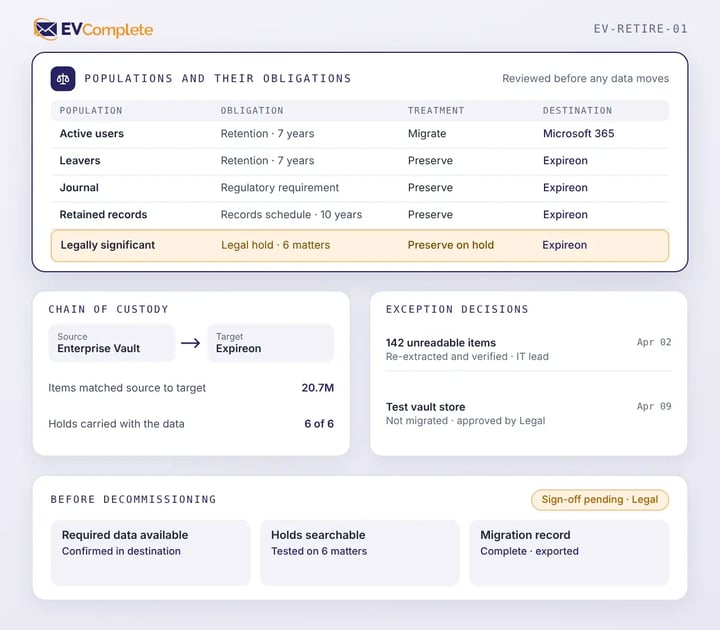
Enterprise Vault data may remain subject to legal hold, retention policies, regulatory requirements, audits, or investigations throughout the migration. These obligations need to be understood before data is moved and must remain supported after the source platform is retired.
Cloudficient helps organizations:
Identify archived populations that require legal, compliance, or records review
EVComplete supports different destinations because mailbox, journal, file, and historical archive data may have different access, legal, retention, and operational requirements.
Move mailbox archive data into Microsoft 365 when users require continued access and the information belongs in the active cloud environment. Preparation may include account mappings, permissions, licenses, migration groups, and schedules.
Move journal, leaver, historical, or legally significant data into Expireon when it must remain governed and accessible outside an active user environment. Preparation may include retention, historical identity, access, and disposition requirements.
Use Microsoft 365 and Expireon together when different Enterprise Vault populations have different accessibility, legal, retention, or operational requirements, so each is governed the way it needs to be after retirement.
EVComplete helps organizations move required operational information, validate the outcome, and retire Enterprise Vault with a clear record of the transition.
EVComplete helps organizations move from an increasingly difficult legacy dependency to a completed and verified modern end-state. Structured workflows, centralized reporting, and managed delivery help maintain progress and identify blockers earlier.
Remove the infrastructure, licensing, maintenance, and operational costs associated with continuing to run Enterprise Vault.
Automate repetitive activities across user communication, provisioning, licensing, migration, and verification. Allow internal IT to focus on platform strategy and business priorities rather than running a specialist archive migration.
Move archived information into systems where it remains available to users, legal teams, compliance functions, and other approved stakeholders. Maintain the data and traceability needed to support continuing legal, retention, and regulatory requirements.

Assess the source environment, prepare the right destinations, automate the migration workflow, and retire Enterprise Vault with a complete record of what happened.